注意
点击 这里 下载完整示例代码
StreamReader 高级用法
作者: Moto Hira
本教程是 StreamReader 基本用法的延续。
这展示了如何使用 StreamReader 进行
设备输入,如麦克风、网络摄像头和屏幕录制
生成合成音频 / 视频
应用自定义过滤表达式的预处理
import torch
import torchaudio

print(torch.__version__)
print(torchaudio.__version__)
2.0.0
2.0.1
try:
    from torchaudio.io import StreamReader
except ModuleNotFoundError:
    try:
        import google.colab

        print(
            """
            To enable running this notebook in Google Colab, install the requisite
            third party libraries by running the following code:

            !add-apt-repository -y ppa:savoury1/ffmpeg4
            !apt-get -qq install -y ffmpeg
            """
        )
    except ModuleNotFoundError:
        pass
    raise

import IPython
import matplotlib.pyplot as plt

base_url = "https://download.pytorch.org/torchaudio/tutorial-assets"
AUDIO_URL = f"{base_url}/Lab41-SRI-VOiCES-src-sp0307-ch127535-sg0042.wav"
VIDEO_URL = f"{base_url}/stream-api/NASAs_Most_Scientifically_Complex_Space_Observatory_Requires_Precision-MP4.mp4"
音频 / 视频设备输入
鉴于系统具备适当的媒体设备,并且 libavdevice 被配置为使用这些设备,流媒体 API 可以从这些设备中拉取媒体流。
要实现这一点,我们向构造函数传递额外的参数 format 和 option
。 format 指定设备组件,
option 字典特定于指定的组件。
要传递的确切参数取决于系统配置。 请参阅 https://ffmpeg.org/ffmpeg-devices.html 以获取详细信息。
以下示例说明了如何在 MacBook Pro 上执行此操作。
首先,我们需要检查可用的设备。
$ ffmpeg -f avfoundation -list_devices true -i ""
[AVFoundation indev @ 0x143f04e50] AVFoundation video devices:
[AVFoundation indev @ 0x143f04e50] [0] FaceTime HD Camera
[AVFoundation indev @ 0x143f04e50] [1] Capture screen 0
[AVFoundation indev @ 0x143f04e50] AVFoundation audio devices:
[AVFoundation indev @ 0x143f04e50] [0] MacBook Pro Microphone
我们使用 FaceTime HD Camera 作为视频设备(索引 0),并使用 MacBook Pro Microphone 作为音频设备(索引 0)。
如果我们不传递任何 option,设备将使用其默认
配置。解码器可能不支持该配置。
>>> StreamReader(
...     src="0:0",  # The first 0 means `FaceTime HD Camera`, and
...                 # the second 0 indicates `MacBook Pro Microphone`.
...     format="avfoundation",
... )
[avfoundation @ 0x125d4fe00] Selected framerate (29.970030) is not supported by the device.
[avfoundation @ 0x125d4fe00] Supported modes:
[avfoundation @ 0x125d4fe00]   1280x720@[1.000000 30.000000]fps
[avfoundation @ 0x125d4fe00]   640x480@[1.000000 30.000000]fps
Traceback (most recent call last):
  File "<stdin>", line 1, in <module>
  ...
RuntimeError: Failed to open the input: 0:0
通过提供 option,我们可以将设备流式传输的格式更改为解码器支持的格式。
>>> streamer = StreamReader(
...     src="0:0",
...     format="avfoundation",
...     option={"framerate": "30", "pixel_format": "bgr0"},
... )
>>> for i in range(streamer.num_src_streams):
...     print(streamer.get_src_stream_info(i))
SourceVideoStream(media_type='video', codec='rawvideo', codec_long_name='raw video', format='bgr0', bit_rate=0, width=640, height=480, frame_rate=30.0)
SourceAudioStream(media_type='audio', codec='pcm_f32le', codec_long_name='PCM 32-bit floating point little-endian', format='flt', bit_rate=3072000, sample_rate=48000.0, num_channels=2)
合成源流
作为设备集成的一部分,ffmpeg 提供了一个“虚拟设备”接口。该接口使用 libavfilter 生成合成的音频/视频数据。
要使用此功能,我们设置 format=lavfi 并向 src 提供一个滤波器描述。
有关滤镜描述的详细信息可以在 https://ffmpeg.org/ffmpeg-filters.html
音频示例
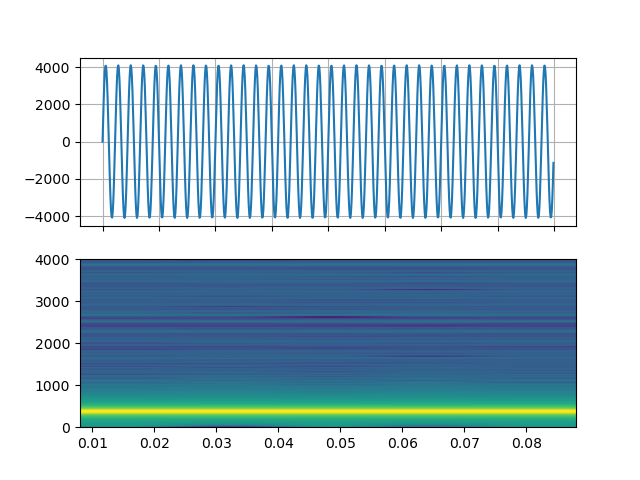
正弦波
https://ffmpeg.org/ffmpeg-filters.html#sine
StreamReader(src="sine=sample_rate=8000:frequency=360", format="lavfi")
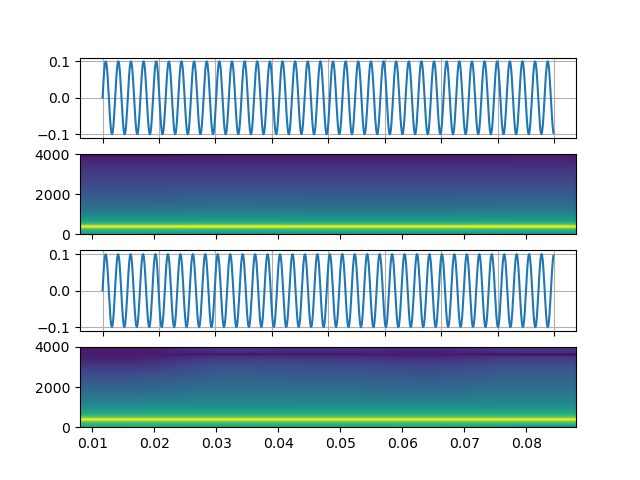
信号与任意表达式
https://ffmpeg.org/ffmpeg-filters.html#aevalsrc
# 5 Hz binaural beats on a 360 Hz carrier
StreamReader(
    src=(
        'aevalsrc='
        'sample_rate=8000:'
        'exprs=0.1*sin(2*PI*(360-5/2)*t)|0.1*sin(2*PI*(360+5/2)*t)'
    ),
    format='lavfi',
 )
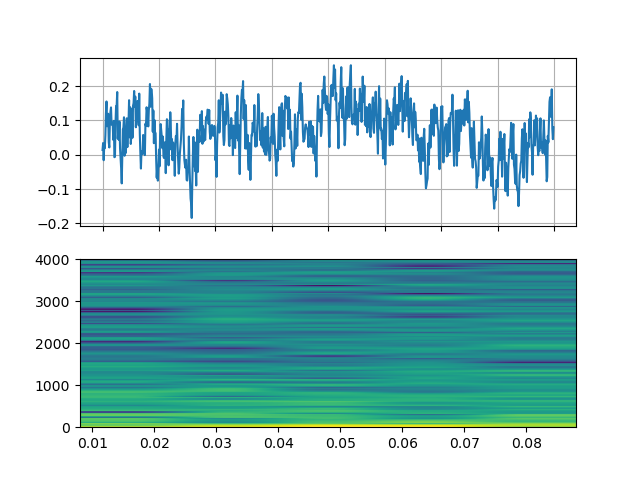
噪声
https://ffmpeg.org/ffmpeg-filters.html#anoisesrc
StreamReader(src="anoisesrc=color=pink:sample_rate=8000:amplitude=0.5", format="lavfi")
视频示例
细胞自动机
https://ffmpeg.org/ffmpeg-filters.html#cellauto
StreamReader(src=f"cellauto", format="lavfi")
曼德博罗
https://ffmpeg.org/ffmpeg-filters.html#cellauto
StreamReader(src=f"mandelbrot", format="lavfi")
MPlayer 测试图案
https://ffmpeg.org/ffmpeg-filters.html#mptestsrc
StreamReader(src=f"mptestsrc", format="lavfi")
约翰·康威的生命游戏
https://ffmpeg.org/ffmpeg-filters.html#life
StreamReader(src=f"life", format="lavfi")
谢尔宾斯基地毯/三角形分形
https://ffmpeg.org/ffmpeg-filters.html#sierpinski
StreamReader(src=f"sierpinski", format="lavfi")
自定义过滤器
定义输出流时,您可以使用
add_audio_stream() 和
add_video_stream() 方法。
这些方法接受 filter_desc 个参数,该参数是一个字符串
格式符合 ffmpeg 的
滤镜表达式。
add_basic_(audio|video)_stream 和
add_(audio|video)_stream 的区别在于 add_basic_(audio|video)_stream
构建了过滤表达式并将其传递给相同的底层
实现。所有 add_basic_(audio|video)_stream 可以通过
add_(audio|video)_stream 实现。
注意
当应用自定义滤镜时,客户端代码必须将 音频/视频流转换为torchaudio 可以转换为张量格式的格式之一。 例如,可以通过将
format=pix_fmts=rgb24应用于视频流并aformat=sample_fmts=fltp应用于音频流来实现这一点。每个输出流都有独立的滤波器图。因此,无法在滤波器表达式中使用不同的输入/输出流。不过,可以将一个输入流拆分为多个流,并在之后将其合并。
音频示例
# fmt: off
descs = [
    # No filtering
    "anull",
    # Apply a highpass filter then a lowpass filter
    "highpass=f=200,lowpass=f=1000",
    # Manipulate spectrogram
    (
        "afftfilt="
        "real='hypot(re,im)*sin(0)':"
        "imag='hypot(re,im)*cos(0)':"
        "win_size=512:"
        "overlap=0.75"
    ),
    # Manipulate spectrogram
    (
        "afftfilt="
        "real='hypot(re,im)*cos((random(0)*2-1)*2*3.14)':"
        "imag='hypot(re,im)*sin((random(1)*2-1)*2*3.14)':"
        "win_size=128:"
        "overlap=0.8"
    ),
]
# fmt: on
sample_rate = 8000

streamer = StreamReader(AUDIO_URL)
for desc in descs:
    streamer.add_audio_stream(
        frames_per_chunk=40000,
        filter_desc=f"aresample={sample_rate},{desc},aformat=sample_fmts=fltp",
    )

chunks = next(streamer.stream())


def _display(i):
    print("filter_desc:", streamer.get_out_stream_info(i).filter_description)
    _, axs = plt.subplots(2, 1)
    waveform = chunks[i][:, 0]
    axs[0].plot(waveform)
    axs[0].grid(True)
    axs[0].set_ylim([-1, 1])
    plt.setp(axs[0].get_xticklabels(), visible=False)
    axs[1].specgram(waveform, Fs=sample_rate)
    return IPython.display.Audio(chunks[i].T, rate=sample_rate)
原始内容
_display(0)
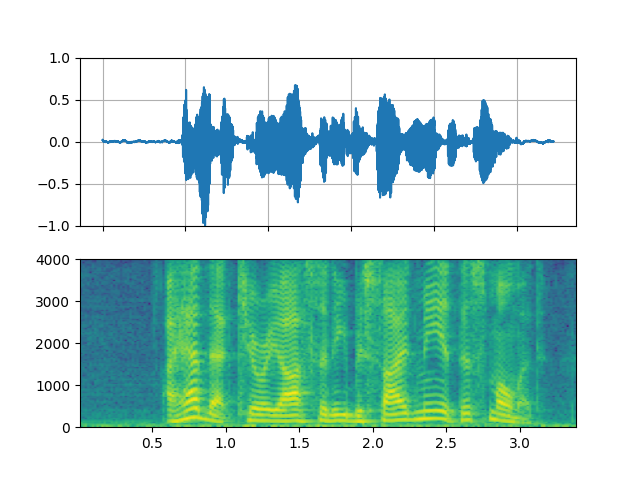
filter_desc: aresample=8000,anull,aformat=sample_fmts=fltp
高通 / 低通滤波器
_display(1)
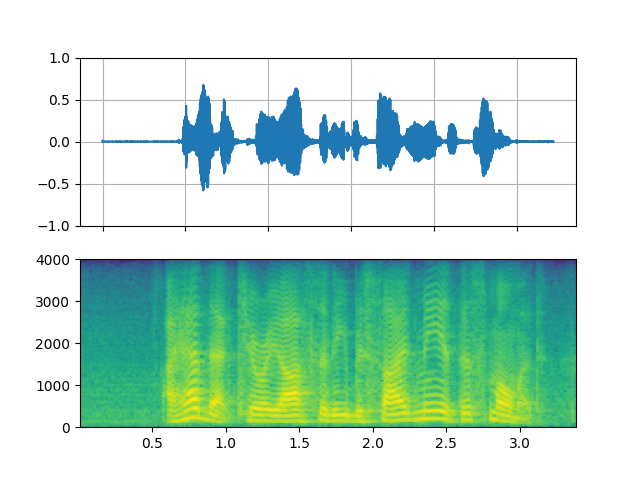
filter_desc: aresample=8000,highpass=f=200,lowpass=f=1000,aformat=sample_fmts=fltp
FFT滤波器 - 机器人 🤖
_display(2)
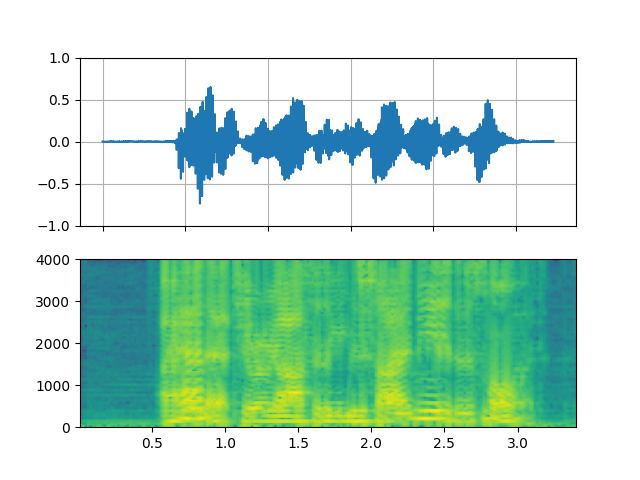
filter_desc: aresample=8000,afftfilt=real='hypot(re,im)*sin(0)':imag='hypot(re,im)*cos(0)':win_size=512:overlap=0.75,aformat=sample_fmts=fltp
FFT滤波器 - Whisper
_display(3)
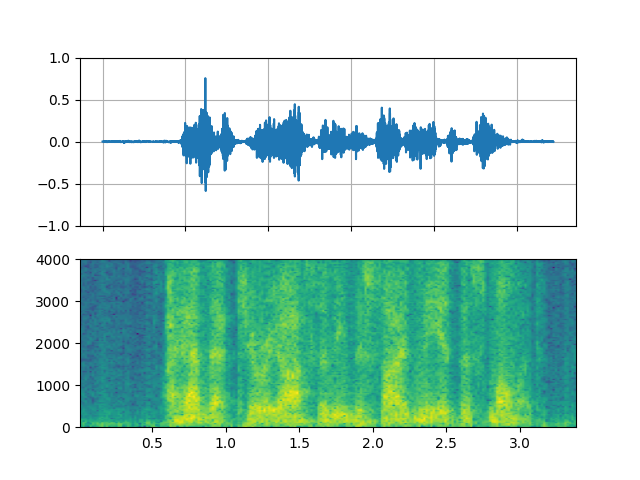
filter_desc: aresample=8000,afftfilt=real='hypot(re,im)*cos((random(0)*2-1)*2*3.14)':imag='hypot(re,im)*sin((random(1)*2-1)*2*3.14)':win_size=128:overlap=0.8,aformat=sample_fmts=fltp
视频示例
# fmt: off
descs = [
    # No effect
    "null",
    # Split the input stream and apply horizontal flip to the right half.
    (
        "split [main][tmp];"
        "[tmp] crop=iw/2:ih:0:0, hflip [flip];"
        "[main][flip] overlay=W/2:0"
    ),
    # Edge detection
    "edgedetect=mode=canny",
    # Rotate image by randomly and fill the background with brown
    "rotate=angle=-random(1)*PI:fillcolor=brown",
    # Manipulate pixel values based on the coordinate
    "geq=r='X/W*r(X,Y)':g='(1-X/W)*g(X,Y)':b='(H-Y)/H*b(X,Y)'"
]
# fmt: on
streamer = StreamReader(VIDEO_URL)
for desc in descs:
    streamer.add_video_stream(
        frames_per_chunk=30,
        filter_desc=f"fps=10,{desc},format=pix_fmts=rgb24",
    )

streamer.seek(12)

chunks = next(streamer.stream())


def _display(i):
    print("filter_desc:", streamer.get_out_stream_info(i).filter_description)
    _, axs = plt.subplots(1, 3, figsize=(8, 1.9))
    chunk = chunks[i]
    for j in range(3):
        axs[j].imshow(chunk[10 * j + 1].permute(1, 2, 0))
        axs[j].set_axis_off()
    plt.tight_layout()
    plt.show(block=False)
原始内容
_display(0)
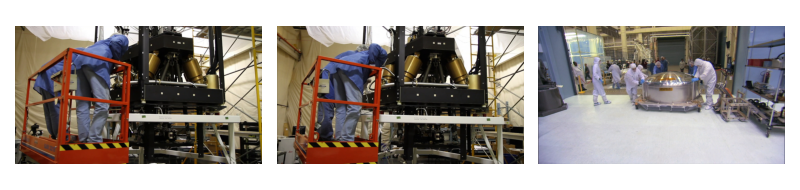
filter_desc: fps=10,null,format=pix_fmts=rgb24
镜像
_display(1)
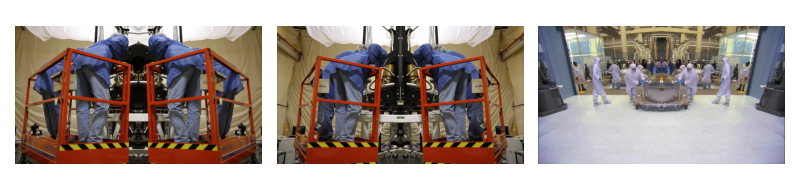
filter_desc: fps=10,split [main][tmp];[tmp] crop=iw/2:ih:0:0, hflip [flip];[main][flip] overlay=W/2:0,format=pix_fmts=rgb24
边缘检测
_display(2)
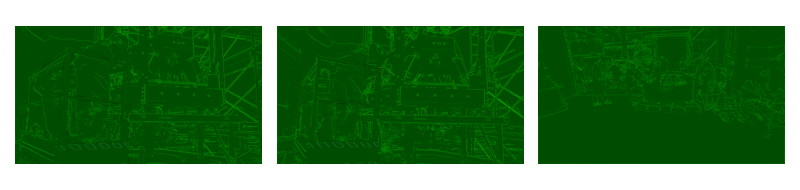
filter_desc: fps=10,edgedetect=mode=canny,format=pix_fmts=rgb24
随机旋转
_display(3)
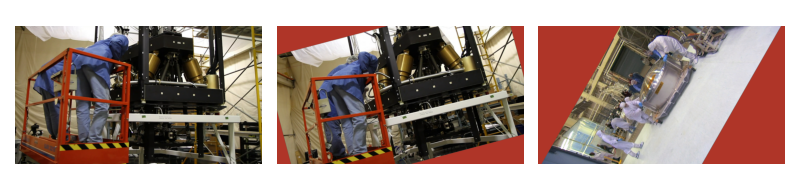
filter_desc: fps=10,rotate=angle=-random(1)*PI:fillcolor=brown,format=pix_fmts=rgb24
像素操作
_display(4)
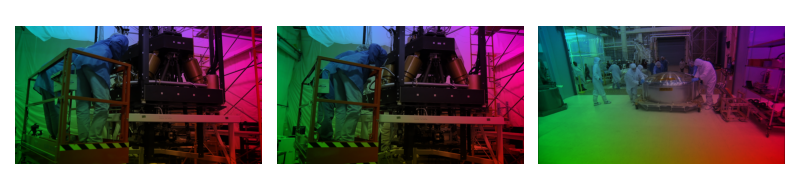
filter_desc: fps=10,geq=r='X/W*r(X,Y)':g='(1-X/W)*g(X,Y)':b='(H-Y)/H*b(X,Y)',format=pix_fmts=rgb24
Tag: torchaudio.io
脚本的总运行时间: ( 0 分钟 20.474 秒)