注意
点击 这里 下载完整示例代码
StreamReader 基本用法
作者: Moto Hira
本教程展示了如何使用 torchaudio.io.StreamReader 来
获取并解码音频/视频数据,并应用 libavfilter 提供的预处理操作。
注意
本教程需要FFmpeg库。 请参阅 FFmpeg依赖项 以获取详细信息。
概述
流式 API 利用了 ffmpeg 强大的 I/O 功能。
- It can
加载多种格式的音频/视频
从本地/远程源加载音频/视频
从类似文件的对象加载音频/视频
从麦克风、摄像头和屏幕加载音频/视频
生成合成的音频/视频信号。
按块加载音频/视频
更改采样率 / 帧率,图像尺寸,实时处理
应用过滤器和预处理
流式 API 的工作分为三个步骤。
开放媒体源(文件、设备、合成图案生成器)
配置输出流
流式传输媒体
此时,ffmpeg 集成所提供的功能 仅限于以下形式
<some media source> -> <optional processing> -> <tensor>
如果您有其他形式可以对您的用例有所帮助, (例如与 torch.Tensor 类型的集成) 请提交一个功能请求。
准备
import torch
import torchaudio

print(torch.__version__)
print(torchaudio.__version__)

import matplotlib.pyplot as plt
from torchaudio.io import StreamReader

base_url = "https://download.pytorch.org/torchaudio/tutorial-assets"
AUDIO_URL = f"{base_url}/Lab41-SRI-VOiCES-src-sp0307-ch127535-sg0042.wav"
VIDEO_URL = f"{base_url}/stream-api/NASAs_Most_Scientifically_Complex_Space_Observatory_Requires_Precision-MP4.mp4"
2.6.0.dev20241104
2.5.0.dev20241105
打开源代码
流式 API 主要可以处理三种不同的数据源。无论使用哪种数据源,其余的处理过程(配置输出、应用预处理)都是相同的。
常见的媒体格式(字符串类型的资源指示符或类似文件的对象)
音频 / 视频设备
合成音频 / 视频源
以下部分介绍了如何打开常见的媒体格式。 对于其他流,请参阅 StreamReader 高级使用。
注意
所支持的媒体(如容器、编解码器和协议)的覆盖范围 取决于系统中找到的 FFmpeg 库。
如果 StreamReader 打开源文件时引发错误,请检查 ffmpeg 命令是否可以处理它。
本地文件
要打开一个媒体文件,你可以简单地将文件的路径传递给 StreamReader 的构造函数。
这适用于图像文件、视频文件和视频流。
网络协议
你也可以直接传递一个URL。
类似文件的对象
你也可以传递一个类似文件的对象。类似文件的对象必须实现
read 方法,符合 io.RawIOBase.read 的规范。
如果给定的文件类似对象具有 seek 方法,StreamReader 也会使用它
在这种情况下,seek 方法应符合
io.IOBase.seek。
在第三方库实现 seek 从而引发错误的情况下,你可以编写一个包装类来屏蔽 seek 方法。
class UnseekableWrapper:
    def __init__(self, obj):
        self.obj = obj

    def read(self, n):
        return self.obj.read(n)
import requests

response = requests.get("https://example.com/video.mp4", stream=True)
s = StreamReader(UnseekableWrapper(response.raw))
import boto3

response = boto3.client("s3").get_object(Bucket="my_bucket", Key="key")
s = StreamReader(UnseekableWrapper(response["Body"]))
注意
当使用不可定位的类似文件对象时,源媒体必须是可流式传输的。 例如,一个格式正确的MP4对象可以将其元数据放在媒体数据的开头或末尾。 元数据位于开头的对象可以在不使用方法 seek 的情况下打开,但元数据位于末尾的对象在不使用 seek 的情况下无法打开。
无标题媒体
如果尝试加载无标题的原始数据,可以使用 format 和
option 来指定数据的格式。
比如说,你使用 sox 条命令将音频文件转换为 faw 格式,如下所示;
# Headerless, 16-bit signed integer PCM, resampled at 16k Hz.
$ sox original.wav -r 16000 raw.s2
此类音频可以按以下方式打开。
StreamReader(src="raw.s2", format="s16le", option={"sample_rate": "16000"})
检查源流
一旦媒体文件被打开,我们可以检查流并配置输出流。
你可以通过
num_src_streams 检查源流的数量。
注意
流的数量并不是通道的数量。 每个音频流可以包含任意数量的通道。
要检查源流的元数据,可以使用
get_src_stream_info()
方法并提供源流的索引。
此方法返回
SourceStream。如果源流是音频类型,则返回类型是
SourceAudioStream,它是
SourceStream 的子类,具有额外的音频特定属性。
同样,如果源流是视频类型,则返回类型是
SourceVideoStream。
对于常规音频格式和静态图像格式,例如 WAV 和 JPEG,源流的数量为 1。
streamer = StreamReader(AUDIO_URL)
print("The number of source streams:", streamer.num_src_streams)
print(streamer.get_src_stream_info(0))
The number of source streams: 1
SourceAudioStream(media_type='audio', codec='pcm_s16le', codec_long_name='PCM signed 16-bit little-endian', format='s16', bit_rate=256000, num_frames=0, bits_per_sample=0, metadata={}, sample_rate=16000.0, num_channels=1)
容器格式和播放列表格式可能包含多种不同媒体类型的流。
The number of source streams: 27
SourceVideoStream(media_type='video', codec='h264', codec_long_name='H.264 / AVC / MPEG-4 AVC / MPEG-4 part 10', format='yuv420p', bit_rate=335457, num_frames=0, bits_per_sample=8, metadata={'compatible_brands': 'mp41mp42isomhlsf', 'creation_time': '2016-12-21T21:37:39.000000Z', 'major_brand': 'mp42', 'minor_version': '1', 'variant_bitrate': '2177116'}, width=960, height=540, frame_rate=60.0)
SourceVideoStream(media_type='video', codec='h264', codec_long_name='H.264 / AVC / MPEG-4 AVC / MPEG-4 part 10', format='yuv420p', bit_rate=1351204, num_frames=0, bits_per_sample=8, metadata={'compatible_brands': 'mp41mp42isomhlsf', 'creation_time': '2016-12-21T21:37:42.000000Z', 'major_brand': 'mp42', 'minor_version': '1', 'variant_bitrate': '8001098'}, width=1920, height=1080, frame_rate=60.0)
SourceVideoStream(media_type='video', codec='h264', codec_long_name='H.264 / AVC / MPEG-4 AVC / MPEG-4 part 10', format='yuv420p', bit_rate=1019347, num_frames=0, bits_per_sample=8, metadata={'compatible_brands': 'mp41mp42isomhlsf', 'creation_time': '2016-12-21T21:37:48.000000Z', 'major_brand': 'mp42', 'minor_version': '1', 'variant_bitrate': '6312875'}, width=1920, height=1080, frame_rate=60.0)
SourceVideoStream(media_type='video', codec='h264', codec_long_name='H.264 / AVC / MPEG-4 AVC / MPEG-4 part 10', format='yuv420p', bit_rate=750899, num_frames=0, bits_per_sample=8, metadata={'compatible_brands': 'mp41mp42isomhlsf', 'creation_time': '2016-12-21T21:37:54.000000Z', 'major_brand': 'mp42', 'minor_version': '1', 'variant_bitrate': '4943747'}, width=1920, height=1080, frame_rate=60.0)
SourceVideoStream(media_type='video', codec='h264', codec_long_name='H.264 / AVC / MPEG-4 AVC / MPEG-4 part 10', format='yuv420p', bit_rate=513057, num_frames=0, bits_per_sample=8, metadata={'compatible_brands': 'mp41mp42isomhlsf', 'creation_time': '2016-12-21T21:37:59.000000Z', 'major_brand': 'mp42', 'minor_version': '1', 'variant_bitrate': '3216424'}, width=1280, height=720, frame_rate=60.0)
SourceVideoStream(media_type='video', codec='h264', codec_long_name='H.264 / AVC / MPEG-4 AVC / MPEG-4 part 10', format='yuv420p', bit_rate=185749, num_frames=0, bits_per_sample=8, metadata={'compatible_brands': 'mp41mp42isomhlsf', 'creation_time': '2016-12-21T21:38:03.000000Z', 'major_brand': 'mp42', 'minor_version': '1', 'variant_bitrate': '1268994'}, width=768, height=432, frame_rate=30.0)
SourceVideoStream(media_type='video', codec='h264', codec_long_name='H.264 / AVC / MPEG-4 AVC / MPEG-4 part 10', format='yuv420p', bit_rate=111939, num_frames=0, bits_per_sample=8, metadata={'compatible_brands': 'mp41mp42isomhlsf', 'creation_time': '2016-12-21T21:38:06.000000Z', 'major_brand': 'mp42', 'minor_version': '1', 'variant_bitrate': '902298'}, width=640, height=360, frame_rate=30.0)
SourceVideoStream(media_type='video', codec='h264', codec_long_name='H.264 / AVC / MPEG-4 AVC / MPEG-4 part 10', format='yuv420p', bit_rate=59938, num_frames=0, bits_per_sample=8, metadata={'compatible_brands': 'mp41mp42isomhlsf', 'creation_time': '2016-12-21T21:38:07.000000Z', 'major_brand': 'mp42', 'minor_version': '1', 'variant_bitrate': '541052'}, width=480, height=270, frame_rate=30.0)
SourceVideoStream(media_type='video', codec='h264', codec_long_name='H.264 / AVC / MPEG-4 AVC / MPEG-4 part 10', format='yuv420p', bit_rate=335457, num_frames=0, bits_per_sample=8, metadata={'compatible_brands': 'mp41mp42isomhlsf', 'creation_time': '2016-12-21T21:37:39.000000Z', 'major_brand': 'mp42', 'minor_version': '1', 'variant_bitrate': '2399619'}, width=960, height=540, frame_rate=60.0)
SourceVideoStream(media_type='video', codec='h264', codec_long_name='H.264 / AVC / MPEG-4 AVC / MPEG-4 part 10', format='yuv420p', bit_rate=1351204, num_frames=0, bits_per_sample=8, metadata={'compatible_brands': 'mp41mp42isomhlsf', 'creation_time': '2016-12-21T21:37:42.000000Z', 'major_brand': 'mp42', 'minor_version': '1', 'variant_bitrate': '8223601'}, width=1920, height=1080, frame_rate=60.0)
SourceVideoStream(media_type='video', codec='h264', codec_long_name='H.264 / AVC / MPEG-4 AVC / MPEG-4 part 10', format='yuv420p', bit_rate=1019347, num_frames=0, bits_per_sample=8, metadata={'compatible_brands': 'mp41mp42isomhlsf', 'creation_time': '2016-12-21T21:37:48.000000Z', 'major_brand': 'mp42', 'minor_version': '1', 'variant_bitrate': '6535378'}, width=1920, height=1080, frame_rate=60.0)
SourceVideoStream(media_type='video', codec='h264', codec_long_name='H.264 / AVC / MPEG-4 AVC / MPEG-4 part 10', format='yuv420p', bit_rate=750899, num_frames=0, bits_per_sample=8, metadata={'compatible_brands': 'mp41mp42isomhlsf', 'creation_time': '2016-12-21T21:37:54.000000Z', 'major_brand': 'mp42', 'minor_version': '1', 'variant_bitrate': '5166250'}, width=1920, height=1080, frame_rate=60.0)
SourceVideoStream(media_type='video', codec='h264', codec_long_name='H.264 / AVC / MPEG-4 AVC / MPEG-4 part 10', format='yuv420p', bit_rate=513057, num_frames=0, bits_per_sample=8, metadata={'compatible_brands': 'mp41mp42isomhlsf', 'creation_time': '2016-12-21T21:37:59.000000Z', 'major_brand': 'mp42', 'minor_version': '1', 'variant_bitrate': '3438927'}, width=1280, height=720, frame_rate=60.0)
SourceVideoStream(media_type='video', codec='h264', codec_long_name='H.264 / AVC / MPEG-4 AVC / MPEG-4 part 10', format='yuv420p', bit_rate=185749, num_frames=0, bits_per_sample=8, metadata={'compatible_brands': 'mp41mp42isomhlsf', 'creation_time': '2016-12-21T21:38:03.000000Z', 'major_brand': 'mp42', 'minor_version': '1', 'variant_bitrate': '1491497'}, width=768, height=432, frame_rate=30.0)
SourceVideoStream(media_type='video', codec='h264', codec_long_name='H.264 / AVC / MPEG-4 AVC / MPEG-4 part 10', format='yuv420p', bit_rate=111939, num_frames=0, bits_per_sample=8, metadata={'compatible_brands': 'mp41mp42isomhlsf', 'creation_time': '2016-12-21T21:38:06.000000Z', 'major_brand': 'mp42', 'minor_version': '1', 'variant_bitrate': '1124801'}, width=640, height=360, frame_rate=30.0)
SourceVideoStream(media_type='video', codec='h264', codec_long_name='H.264 / AVC / MPEG-4 AVC / MPEG-4 part 10', format='yuv420p', bit_rate=59938, num_frames=0, bits_per_sample=8, metadata={'compatible_brands': 'mp41mp42isomhlsf', 'creation_time': '2016-12-21T21:38:07.000000Z', 'major_brand': 'mp42', 'minor_version': '1', 'variant_bitrate': '763555'}, width=480, height=270, frame_rate=30.0)
SourceVideoStream(media_type='video', codec='h264', codec_long_name='H.264 / AVC / MPEG-4 AVC / MPEG-4 part 10', format='yuv420p', bit_rate=335457, num_frames=0, bits_per_sample=8, metadata={'compatible_brands': 'mp41mp42isomhlsf', 'creation_time': '2016-12-21T21:37:39.000000Z', 'major_brand': 'mp42', 'minor_version': '1', 'variant_bitrate': '2207619'}, width=960, height=540, frame_rate=60.0)
SourceVideoStream(media_type='video', codec='h264', codec_long_name='H.264 / AVC / MPEG-4 AVC / MPEG-4 part 10', format='yuv420p', bit_rate=1351204, num_frames=0, bits_per_sample=8, metadata={'compatible_brands': 'mp41mp42isomhlsf', 'creation_time': '2016-12-21T21:37:42.000000Z', 'major_brand': 'mp42', 'minor_version': '1', 'variant_bitrate': '8031601'}, width=1920, height=1080, frame_rate=60.0)
SourceVideoStream(media_type='video', codec='h264', codec_long_name='H.264 / AVC / MPEG-4 AVC / MPEG-4 part 10', format='yuv420p', bit_rate=1019347, num_frames=0, bits_per_sample=8, metadata={'compatible_brands': 'mp41mp42isomhlsf', 'creation_time': '2016-12-21T21:37:48.000000Z', 'major_brand': 'mp42', 'minor_version': '1', 'variant_bitrate': '6343378'}, width=1920, height=1080, frame_rate=60.0)
SourceVideoStream(media_type='video', codec='h264', codec_long_name='H.264 / AVC / MPEG-4 AVC / MPEG-4 part 10', format='yuv420p', bit_rate=750899, num_frames=0, bits_per_sample=8, metadata={'compatible_brands': 'mp41mp42isomhlsf', 'creation_time': '2016-12-21T21:37:54.000000Z', 'major_brand': 'mp42', 'minor_version': '1', 'variant_bitrate': '4974250'}, width=1920, height=1080, frame_rate=60.0)
SourceVideoStream(media_type='video', codec='h264', codec_long_name='H.264 / AVC / MPEG-4 AVC / MPEG-4 part 10', format='yuv420p', bit_rate=513057, num_frames=0, bits_per_sample=8, metadata={'compatible_brands': 'mp41mp42isomhlsf', 'creation_time': '2016-12-21T21:37:59.000000Z', 'major_brand': 'mp42', 'minor_version': '1', 'variant_bitrate': '3246927'}, width=1280, height=720, frame_rate=60.0)
SourceVideoStream(media_type='video', codec='h264', codec_long_name='H.264 / AVC / MPEG-4 AVC / MPEG-4 part 10', format='yuv420p', bit_rate=185749, num_frames=0, bits_per_sample=8, metadata={'compatible_brands': 'mp41mp42isomhlsf', 'creation_time': '2016-12-21T21:38:03.000000Z', 'major_brand': 'mp42', 'minor_version': '1', 'variant_bitrate': '1299497'}, width=768, height=432, frame_rate=30.0)
SourceVideoStream(media_type='video', codec='h264', codec_long_name='H.264 / AVC / MPEG-4 AVC / MPEG-4 part 10', format='yuv420p', bit_rate=111939, num_frames=0, bits_per_sample=8, metadata={'compatible_brands': 'mp41mp42isomhlsf', 'creation_time': '2016-12-21T21:38:06.000000Z', 'major_brand': 'mp42', 'minor_version': '1', 'variant_bitrate': '932801'}, width=640, height=360, frame_rate=30.0)
SourceVideoStream(media_type='video', codec='h264', codec_long_name='H.264 / AVC / MPEG-4 AVC / MPEG-4 part 10', format='yuv420p', bit_rate=59938, num_frames=0, bits_per_sample=8, metadata={'compatible_brands': 'mp41mp42isomhlsf', 'creation_time': '2016-12-21T21:38:07.000000Z', 'major_brand': 'mp42', 'minor_version': '1', 'variant_bitrate': '571555'}, width=480, height=270, frame_rate=30.0)
SourceAudioStream(media_type='audio', codec='aac', codec_long_name='AAC (Advanced Audio Coding)', format='fltp', bit_rate=60076, num_frames=0, bits_per_sample=0, metadata={'comment': 'English', 'compatible_brands': 'mp41mp42isomhlsf', 'creation_time': '2016-12-21T22:14:57.000000Z', 'language': 'en', 'major_brand': 'mp42', 'minor_version': '1'}, sample_rate=48000.0, num_channels=2)
SourceAudioStream(media_type='audio', codec='ac3', codec_long_name='ATSC A/52A (AC-3)', format='fltp', bit_rate=384000, num_frames=0, bits_per_sample=0, metadata={'comment': 'English', 'compatible_brands': 'mp41mp42isomhlsf', 'creation_time': '2016-12-21T22:15:46.000000Z', 'language': 'en', 'major_brand': 'mp42', 'minor_version': '1'}, sample_rate=48000.0, num_channels=6)
SourceAudioStream(media_type='audio', codec='eac3', codec_long_name='ATSC A/52B (AC-3, E-AC-3)', format='fltp', bit_rate=192000, num_frames=0, bits_per_sample=0, metadata={'comment': 'English', 'compatible_brands': 'mp41mp42isomhlsf', 'creation_time': '2016-12-21T22:16:17.000000Z', 'language': 'en', 'major_brand': 'mp42', 'minor_version': '1'}, sample_rate=48000.0, num_channels=6)
配置输出流
流 API 允许你从任意组合的输入流中流式传输数据。如果你的应用不需要音频或视频,可以省略它们。或者,如果你想对同一源流应用不同的预处理,可以复制该源流。
默认流
当源中有多个流时,不清楚应该使用哪个流。
FFmpeg 实现了一些启发式方法来确定默认流。 得到的流索引通过以下方式暴露:
default_audio_stream 和
default_video_stream。
配置输出流
一旦你知道要使用哪个源流,就可以使用
add_basic_audio_stream() 和
add_basic_video_stream() 配置输出流。
这些方法提供了一种简单的方式来更改媒体的基本属性,以满足应用程序的需求。
两种方法共有的参数是;
frames_per_chunk: 每次迭代最多应返回多少帧。 对于音频,生成的张量形状将是 (frames_per_chunk, num_channels)。 对于视频,它将是 (frames_per_chunk, num_channels, height, width)。buffer_chunk_size: 内部缓冲的最大块数。 当StreamReader缓冲了这个数量的块,并被要求拉取更多帧时,StreamReader会丢弃旧的帧/块。stream_index: 源流的索引。decoder: 如果提供,将覆盖解码器。如果无法检测到编解码器时很有用。decoder_option: 解码器的选项。
对于音频输出流,你可以提供以下附加参数来更改音频属性。
format: 默认情况下,StreamReader 返回 float32 类型的张量, 其样本值范围为 [-1, 1]。通过提供format参数, 可以更改结果的数据类型和值范围。sample_rate: 当提供时,StreamReader 会实时对音频进行重采样。
对于视频输出流,以下参数是可用的。
format: 图像帧格式。默认情况下,StreamReader 以 8 位 3 通道、RGB 顺序返回帧。frame_rate: 通过丢弃或复制帧来更改帧率。不进行插值。width,height: 修改图像尺寸。
streamer = StreamReader(...)

# Stream audio from default audio source stream
# 256 frames at a time, keeping the original sampling rate.
streamer.add_basic_audio_stream(
    frames_per_chunk=256,
)

# Stream audio from source stream `i`.
# Resample audio to 8k Hz, stream 256 frames at each
streamer.add_basic_audio_stream(
    frames_per_chunk=256,
    stream_index=i,
    sample_rate=8000,
)
# Stream video from default video source stream.
# 10 frames at a time, at 30 FPS
# RGB color channels.
streamer.add_basic_video_stream(
    frames_per_chunk=10,
    frame_rate=30,
    format="rgb24"
)

# Stream video from source stream `j`,
# 10 frames at a time, at 30 FPS
# BGR color channels with rescaling to 128x128
streamer.add_basic_video_stream(
    frames_per_chunk=10,
    stream_index=j,
    frame_rate=30,
    width=128,
    height=128,
    format="bgr24"
)
你可以通过与检查源流类似的方式检查生成的输出流。
num_out_streams 报告
配置的输出流数量,而
get_out_stream_info()
获取有关输出流的信息。
如果你想移除一个输出流,你可以使用
remove_stream() 种方法。
# Removes the first output stream.
streamer.remove_stream(0)
流式处理
要流式传输媒体数据,流式传输器会交替执行从源获取和解码数据的过程,并将生成的音频/视频数据传递给客户端代码。
存在执行这些操作的低级方法。
is_buffer_ready(),
process_packet() 和
pop_chunks()。
在本教程中,我们将使用高级API,迭代器协议。
它就像一个 for 循环。
streamer = StreamReader(...)
streamer.add_basic_audio_stream(...)
streamer.add_basic_video_stream(...)

for chunks in streamer.stream():
    audio_chunk, video_chunk = chunks
    ...
示例
让我们以一个示例视频来配置输出流。 我们将使用以下视频。
来源: https://svs.gsfc.nasa.gov/13013 (该视频属于公共领域)
版权:美国宇航局戈达德太空飞行中心。
NASA的媒体使用指南: https://www.nasa.gov/multimedia/guidelines/index.html
打开源媒体
首先,让我们列出可用的流及其属性。
SourceVideoStream(media_type='video', codec='h264', codec_long_name='H.264 / AVC / MPEG-4 AVC / MPEG-4 part 10', format='yuv420p', bit_rate=9958354, num_frames=6175, bits_per_sample=8, metadata={'creation_time': '2018-07-24T17:40:48.000000Z', 'encoder': 'AVC Coding', 'handler_name': '\x1fMainconcept Video Media Handler', 'language': 'eng', 'vendor_id': '[0][0][0][0]'}, width=1920, height=1080, frame_rate=29.97002997002997)
SourceAudioStream(media_type='audio', codec='aac', codec_long_name='AAC (Advanced Audio Coding)', format='fltp', bit_rate=317375, num_frames=9658, bits_per_sample=0, metadata={'creation_time': '2018-07-24T17:40:48.000000Z', 'handler_name': '#Mainconcept MP4 Sound Media Handler', 'language': 'eng', 'vendor_id': '[0][0][0][0]'}, sample_rate=48000.0, num_channels=2)
现在我们配置输出流。
配置输出流
# fmt: off
# Audio stream with 8k Hz
streamer.add_basic_audio_stream(
    frames_per_chunk=8000,
    sample_rate=8000,
)

# Audio stream with 16k Hz
streamer.add_basic_audio_stream(
    frames_per_chunk=16000,
    sample_rate=16000,
)

# Video stream with 960x540 at 1 FPS.
streamer.add_basic_video_stream(
    frames_per_chunk=1,
    frame_rate=1,
    width=960,
    height=540,
    format="rgb24",
)

# Video stream with 320x320 (stretched) at 3 FPS, grayscale
streamer.add_basic_video_stream(
    frames_per_chunk=3,
    frame_rate=3,
    width=320,
    height=320,
    format="gray",
)
# fmt: on
注意
当配置多个输出流时,为了保持所有流同步,请设置参数以确保
frames_per_chunk 与 sample_rate 或 frame_rate 之间的比例
在各个输出流中保持一致。
检查输出流。
OutputAudioStream(source_index=1, filter_description='aresample=8000,aformat=sample_fmts=fltp', media_type='audio', format='fltp', sample_rate=8000.0, num_channels=2)
OutputAudioStream(source_index=1, filter_description='aresample=16000,aformat=sample_fmts=fltp', media_type='audio', format='fltp', sample_rate=16000.0, num_channels=2)
OutputVideoStream(source_index=0, filter_description='fps=1,scale=width=960:height=540,format=pix_fmts=rgb24', media_type='video', format='rgb24', width=960, height=540, frame_rate=1.0)
OutputVideoStream(source_index=0, filter_description='fps=3,scale=width=320:height=320,format=pix_fmts=gray', media_type='video', format='gray', width=320, height=320, frame_rate=3.0)
移除第二个音频流。
OutputAudioStream(source_index=1, filter_description='aresample=8000,aformat=sample_fmts=fltp', media_type='audio', format='fltp', sample_rate=8000.0, num_channels=2)
OutputVideoStream(source_index=0, filter_description='fps=1,scale=width=960:height=540,format=pix_fmts=rgb24', media_type='video', format='rgb24', width=960, height=540, frame_rate=1.0)
OutputVideoStream(source_index=0, filter_description='fps=3,scale=width=320:height=320,format=pix_fmts=gray', media_type='video', format='gray', width=320, height=320, frame_rate=3.0)
流式处理
跳转到第10秒的位置。
streamer.seek(10.0)
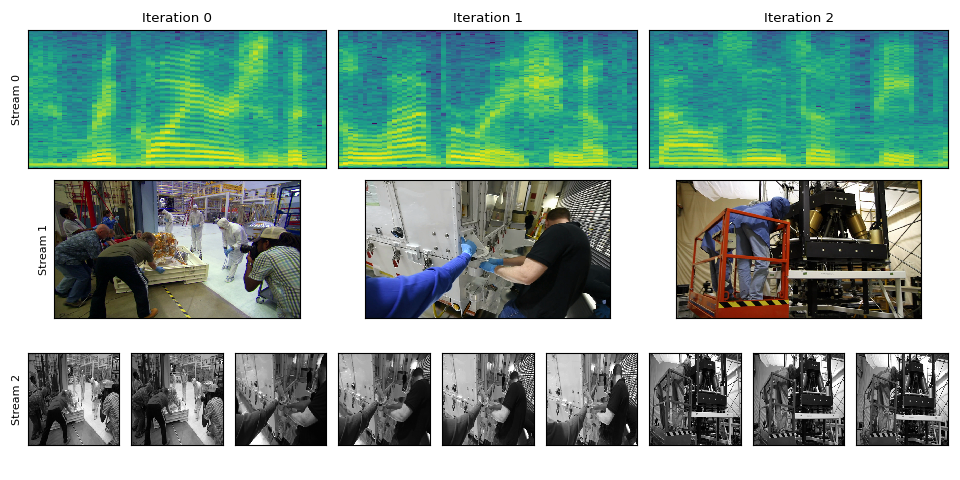
现在,让我们最后遍历输出流。
对于音频流,块张量的形状将是 (frames_per_chunk, num_channels),而对于视频流, 它是 (frames_per_chunk, num_color_channels, height, width)。
torch.Size([8000, 2])
torch.Size([1, 3, 540, 960])
torch.Size([3, 1, 320, 320])
让我们可视化我们接收到的内容。
k = 3
fig = plt.figure()
gs = fig.add_gridspec(3, k * n_ite)
for i, waveform in enumerate(waveforms):
    ax = fig.add_subplot(gs[0, k * i : k * (i + 1)])
    ax.specgram(waveform[:, 0], Fs=8000)
    ax.set_yticks([])
    ax.set_xticks([])
    ax.set_title(f"Iteration {i}")
    if i == 0:
        ax.set_ylabel("Stream 0")
for i, vid in enumerate(vids1):
    ax = fig.add_subplot(gs[1, k * i : k * (i + 1)])
    ax.imshow(vid[0].permute(1, 2, 0))  # NCHW->HWC
    ax.set_yticks([])
    ax.set_xticks([])
    if i == 0:
        ax.set_ylabel("Stream 1")
for i, vid in enumerate(vids2):
    for j in range(3):
        ax = fig.add_subplot(gs[2, k * i + j : k * i + j + 1])
        ax.imshow(vid[j].permute(1, 2, 0), cmap="gray")
        ax.set_yticks([])
        ax.set_xticks([])
        if i == 0 and j == 0:
            ax.set_ylabel("Stream 2")
plt.tight_layout()
Tag: torchaudio.io
脚本的总运行时间: ( 0 分钟 14.379 秒)