使用QAT微调Llama3
量化感知训练(QAT)是一种常用技术,帮助用户在量化模型时避免精度或困惑度出现显著下降。本教程将逐步介绍如何在微调过程中应用 QAT,对生成的模型进行量化,并使用 torchtune 评估您的量化模型。
什么是量化感知训练(QAT)以及它如何帮助减少量化带来的性能下降
如何在 torchtune 微调期间运行量化感知训练(QAT)
连接量化感知训练、量化和评估配方的端到端示例
熟悉 torchtune
确保已 安装 torchtune
请确保您已下载了 Llama3-8B 模型权重
什么是量化感知训练(QAT)?
量化感知训练(QAT)是指在训练或微调过程中模拟量化数值,最终目标是生成比简单后训练量化(PTQ)质量更高的量化模型。在QAT期间,权重和/或激活值会被“假量化”,这意味着它们被转换为仿佛正在被量化,但保持在原始数据类型(例如bfloat16)中,而不会实际转换为更低的位宽。因此,假量化允许模型在更新权重时调整量化噪声,从而使训练过程“意识到”模型在训练完成后将被量化。
# PTQ: x_q is quantized and cast to int8
# scale and zero point (zp) refer to parameters used to quantize x_float
# qmin and qmax refer to the range of quantized values
x_q = (x_float / scale + zp).round().clamp(qmin, qmax).cast(int8)

# QAT: x_fq is still in float
# Fake quantize simulates the numerics of quantize + dequantize
x_fq = (x_float / scale + zp).round().clamp(qmin, qmax)
x_fq = (x_fq - zp) * scale
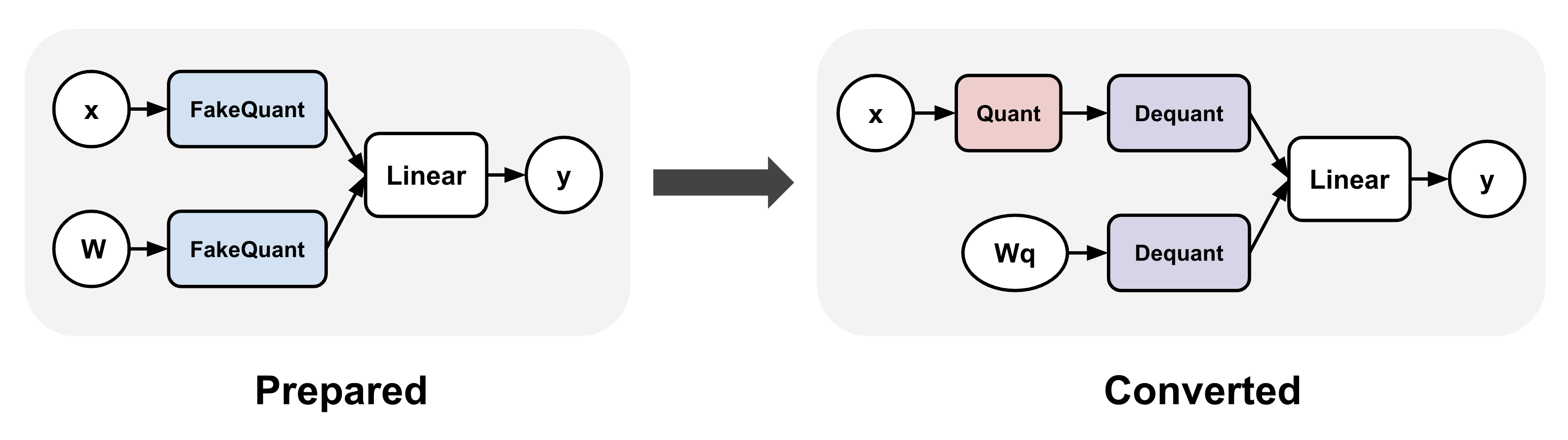
量化感知训练(QAT)通常涉及在训练前后对模型应用转换。
例如,在 torchao QAT 实现 中,
这些步骤由 prepare() 和 convert() 步表示:(1) prepare() 在线性层中插入伪量化操作,
以及 (2) convert() 在训练后将伪量化操作转换为实际的量化和反量化操作,从而生成一个量化模型
(反量化操作通常在降低阶段与线性操作融合)。
在这两个步骤之间,训练可以像之前一样继续进行。
对Llama3模型应用量化感知训练
我们可以轻松地将上述量化感知训练(QAT)转换应用于 torchtune 中的 Llama3 以进行微调:
from torchtune.training.quantization import Int8DynActInt4WeightQATQuantizer
from torchtune.models.llama3 import llama3_8b

model = llama3_8b()

# Quantizer for int8 dynamic per token activations +
# int4 grouped per channel weights, only for linear layers
quantizer = Int8DynActInt4WeightQATQuantizer()

# Insert "fake quantize" operations into linear layers.
# These operations simulate quantization numerics during
# fine-tuning without performing any dtype casting
prepared_model = quantizer.prepare(model)
如果我们打印模型,我们会看到所有的线性层已经被替换为
Int8DynActInt4WeightQATLinear,这模拟了 int8 动态每 token 激活 + int4 分组每通道权重的数值。现在模型已经准备好进行微调。
>>> print(model.layers[0].attn)
MultiHeadAttention(
  (q_proj): Linear(in_features=4096, out_features=4096, bias=False)
  (k_proj): Linear(in_features=4096, out_features=1024, bias=False)
  (v_proj): Linear(in_features=4096, out_features=1024, bias=False)
  (output_proj): Linear(in_features=4096, out_features=4096, bias=False)
  (pos_embeddings): RotaryPositionalEmbeddings()
)

>>> print(prepared_model.layers[0].attn)
MultiHeadAttention(
  (q_proj): Int8DynActInt4WeightQATLinear(in_features=4096, out_features=4096, bias=False)
  (k_proj): Int8DynActInt4WeightQATLinear(in_features=4096, out_features=1024, bias=False)
  (v_proj): Int8DynActInt4WeightQATLinear(in_features=4096, out_features=1024, bias=False)
  (output_proj): Int8DynActInt4WeightQATLinear(in_features=4096, out_features=4096, bias=False)
  (pos_embeddings): RotaryPositionalEmbeddings()
)
微调之后,我们可以将模型转换为实际的量化模型。 如果我们打印转换后的模型,我们会看到QAT线性层已经被 Int8DynActInt4WeightLinear 替换,这是线性层的量化版本。 这个量化模型可以保存到检查点,并用于推理或生成。
# Fine-tune as before
train_loop(prepared_model)

# Convert fake quantize to actual quantize operations
converted_model = quantizer.convert(prepared_model)
>>> print(converted_model.layers[0].attn)
MultiHeadAttention(
  (q_proj): Int8DynActInt4WeightLinear()
  (k_proj): Int8DynActInt4WeightLinear()
  (v_proj): Int8DynActInt4WeightLinear()
  (output_proj): Int8DynActInt4WeightLinear()
  (pos_embeddings): RotaryPositionalEmbeddings()
)
PyTorch中的量化感知训练(QAT)微调教程
将所有内容放在一起,我们现在可以使用torchtune的QAT recipe <qat_distributed_recipe_label>来微调模型。 请确保您已经按照这些说明下载了Llama3权重和分词器。在这个教程中, 我们使用以下设置来展示QAT在恢复量化退化方面的有效性,与直接量化未经QAT微调的模型相比。 您可以复制默认的QAT配置并根据需要进行以下修改:
tune cp llama3/8B_qat_full custom_8B_qat_full.yaml
# Dataset
dataset:
  _component_: torchtune.datasets.text_completion_dataset
  source: allenai/c4
  max_seq_len: 8192
  column: text
  name: en
  split: train
seed: null
shuffle: True

...

epochs: 1
max_steps_per_epoch: 2000
fake_quant_after_n_steps: 1000
memory_efficient_fsdp_wrap: False
注意
torchtune 中的 QAT 目前与 memory_efficient_fsdp_wrap 不兼容。 这是一个已知问题,将在未来的 torchtune 版本中修复。
经验表明,我们在前 N 步禁用伪量化可获得更好的结果,这可能是因为这样做允许权重在开始向微调过程引入量化噪声之前先趋于稳定。因此,在此我们禁用前 1000 步的伪量化。
然后,您可以使用以下命令,结合上述配置运行基于量化感知训练(QAT)的微调。此工作负载至少需要 6 块 GPU,每块显存容量不低于 80GB。默认情况下,该配置采用上文所示的“按 token 动态 int8 激活 + 按通道分组 int4 权重”量化方案:
tune run --nnodes 1 --nproc_per_node 6 qat_distributed --config custom_8B_qat_full.yaml
注意
请确保指向您的 Llama3 权重和分词器的位置。这可以通过添加 checkpointer.checkpoint_files=[my_model_checkpoint_path] tokenizer_checkpoint=my_tokenizer_checkpoint_path 完成,
或者直接修改 8B_qat_full.yaml 文件。有关如何轻松克隆和修改 torchtune 配置的更多细节,请参阅我们的 关于配置的一切。
注意
与常规微调相比,量化感知训练(QAT)会引入额外的内存和计算开销,因为模拟量化本质上涉及额外的操作,并且需要克隆权重以避免在计算模拟量化值时修改原始权重。总体而言,我们预计对于 Llama3-8B 等模型,微调速度将下降约 30%。若启用激活检查点技术,每张 GPU 的显存占用增加量极小(每张 GPU 小于 5GB)。
量化QAT模型
请注意,上述量化感知训练(QAT)方案生成的是未量化的 bfloat16 模型。该模型结构与使用常规全量微调(不含 QAT)生成的模型完全相同,仅权重不同。若要获得真正的量化模型,请复制并对量化配置进行以下修改:
tune cp quantization custom_quantization.yaml
# Model arguments
model:
  _component_: torchtune.models.llama3.llama3_8b

checkpointer:
  _component_: torchtune.training.FullModelMetaCheckpointer
  checkpoint_dir: <your QAT checkpoint dir>
  checkpoint_files: [meta_model_0.pt]
  recipe_checkpoint: null
  output_dir: <your QAT checkpoint dir>
  model_type: LLAMA3

...

quantizer:
  _component_: torchtune.training.quantization.Int8DynActInt4WeightQATQuantizer
  groupsize: 256
以下命令在量化感知训练(QAT)流程中执行转换步骤,该步骤实际上将浮点模型转换为具有量化权重的模型:
tune run quantize --config custom_quantization.yaml
注意
请确保使用与微调模型时相同的 QAT 量化器,否则数值会出现偏差,导致量化模型性能下降。
评估量化模型
现在我们有了一个量化模型,我们可以对其进行一些评估,并将结果与没有QAT(即训练后量化)的常规微调进行比较。 为了实现这一点,我们使用 EleutherAI 的评估工具包,该工具包已集成到 torchtune 中。首先,复制评估配置并进行以下更改:
tune cp eleuther_evaluation custom_eleuther_evaluation.yaml
# Model arguments
model:
  _component_: torchtune.models.llama3.llama3_8b

checkpointer:
  _component_: torchtune.training.FullModelTorchTuneCheckpointer
  checkpoint_dir: <your quantized model checkpoint dir>
  checkpoint_files: [meta_model_0-8da4w.pt]
  recipe_checkpoint: null
  output_dir: <your quantized model checkpoint dir>
  model_type: LLAMA3

...

# EleutherAI specific eval args
tasks: ["hellaswag", "wikitext"]
limit: null
max_seq_length: 8192
batch_size: 8

quantizer:
  _component_: torchtune.training.quantization.Int8DynActInt4WeightQuantizer
  groupsize: 256
注意
由于我们传入的是量化模型,请务必使用相应的后训练量化器,而不是QAT量化器。例如,如果您在微调期间使用了Int8DynActInt4WeightQATQuantizer,则在此步骤中应指定Int8DynActInt4WeightQuantizer。有关支持的量化器的完整列表,请参阅量化配方。
现在运行评估配方:
tune run eleuther_eval --config my_eleuther_evaluation.yaml
结果应类似于以下内容:
# QAT quantized model evaluation results (int8 activations + int4 weights)

|  Tasks  |Version|Filter|n-shot|    Metric     |Value |   |Stderr|
|---------|------:|------|-----:|---------------|-----:|---|------|
|wikitext |      2|none  |     0|word_perplexity|9.9148|±  |N/A   |
|         |       |none  |     0|byte_perplexity|1.5357|±  |N/A   |
|         |       |none  |     0|bits_per_byte  |0.6189|±  |N/A   |
|hellaswag|      1|none  |     0|acc            |0.5687|±  |0.0049|
|         |       |none  |     0|acc_norm       |0.7536|±  |0.0043|
将这些结果与未使用量化感知训练(QAT)进行微调的模型进行比较,我们可以看到,与仅采用后训练量化(PTQ)相比,QAT 能够恢复原始非量化模型因量化而造成的显著性能下降。例如,在 hellaswag 任务中,与原始非量化模型相比,PTQ 使归一化准确率下降了 2.20%,而 QAT 仅下降了 0.74%。同样,在 wikitext 任务中,PTQ 使词困惑度增加了 2.048,而 QAT 仅增加了 1.190(数值越低越好)。
# PTQ quantized model evaluation results (int8 activations + int4 weights)

|  Tasks  |Version|Filter|n-shot|    Metric     | Value |   |Stderr|
|---------|------:|------|-----:|---------------|------:|---|------|
|wikitext |      2|none  |     0|word_perplexity|10.7735|±  |N/A   |
|         |       |none  |     0|byte_perplexity| 1.5598|±  |N/A   |
|         |       |none  |     0|bits_per_byte  | 0.6413|±  |N/A   |
|hellaswag|      1|none  |     0|acc            | 0.5481|±  |0.0050|
|         |       |none  |     0|acc_norm       | 0.7390|±  |0.0044|
# Float model evaluation results (bfloat16)

|  Tasks  |Version|Filter|n-shot|    Metric     |Value |   |Stderr|
|---------|------:|------|-----:|---------------|-----:|---|------|
|wikitext |      2|none  |     0|word_perplexity|8.7251|±  |N/A   |
|         |       |none  |     0|byte_perplexity|1.4994|±  |N/A   |
|         |       |none  |     0|bits_per_byte  |0.5844|±  |N/A   |
|hellaswag|      1|none  |     0|acc            |0.5740|±  |0.0049|
|         |       |none  |     0|acc_norm       |0.7610|±  |0.0043|
因此,量化感知训练(QAT)流程生成的量化模型性能优于训练后量化的模型。重要的是,两种流程中的量化模型结构完全相同,因此模型大小、内存占用以及其他所有性能特征也保持一致。
请注意,尽管权重被量化为 int4,但 QAT 和 PTQ 流程的量化模型大小均为 8.187 GB,而原始 float 模型大小为 14.958 GB。这是因为该量化器使用 int8 来表示权重,因为 PyTorch 尚未原生支持 int4 数据类型。更高效的表示方式是将 int4 权重进行打包,这将使量化模型大小减半。Int4WeightOnlyQuantizer 正是这样做的,相应的 QAT 量化器将在未来添加。
降低量化感知训练(QAT)模型到设备(可选)
量化模型的一个重要动机是能够在资源受限的环境中运行它。你可以通过遵循这些说明,使用executorch将你的QAT Llama3模型进一步降低到边缘设备(如智能手机)上。例如,以下命令将模型降低到XNNPACK后端:
python -m examples.models.llama2.export_llama --checkpoint <your QAT checkpoint> -p <params.json> -kv --use_sdpa_with_kv_cache -X -qmode 8da4w --group_size 256 -d fp32 --metadata '{"get_bos_id":128000, "get_eos_id":128001}' --embedding-quantize 4,32 --output_name="llama3_8da4w.pte"
这使得量化后的模型体积大幅减小至 3.881 GB。在 OnePlus 12 智能手机上进行基准测试时,该模型的推理和生成速度与训练后量化模型相当。这是因为两种流程中的模型结构完全一致:
QAT |
PTQ |
|
|---|---|---|
量化模型大小 |
3.881 GB |
3.881 GB |
推理速度 |
9.709 个词/秒 |
9.815 词/秒 |
生成速度 |
11.316 词/秒 |
11.364 个词/秒 |