注意
转到末尾 以下载完整示例代码。
循环DQN:训练循环策略
作者: Vincent Moens
如何在 TorchRL 中的演员中加入 RNN
如何使用基于内存的策略与重放缓冲区和损失模块
PyTorch v2.0.0
gym[mujoco]
进度条
概览
基于记忆的策略不仅在观测信息部分可观测时至关重要,而且在必须考虑时间维度以做出明智决策时也同样重要。
循环神经网络长期以来一直是基于记忆的策略的常用工具。其基本思想是在连续两个时间步之间于内存中维持一个循环状态,并将该状态与当前观测值一同作为策略的输入。
本教程展示了如何使用 TorchRL 在策略中集成 RNN。
核心收获:
在 TorchRL 中将 RNN 集成到演员中;
使用基于内存的策略,配合重放缓冲区和损失模块。
在 TorchRL 中使用 RNN 的核心思想是利用 TensorDict 作为数据载体,在各个时间步之间传递隐藏状态。我们将构建一个策略,该策略从当前的 TensorDict 中读取上一时刻的循环状态,并将当前的循环状态写入下一时刻状态对应的 TensorDict 中:
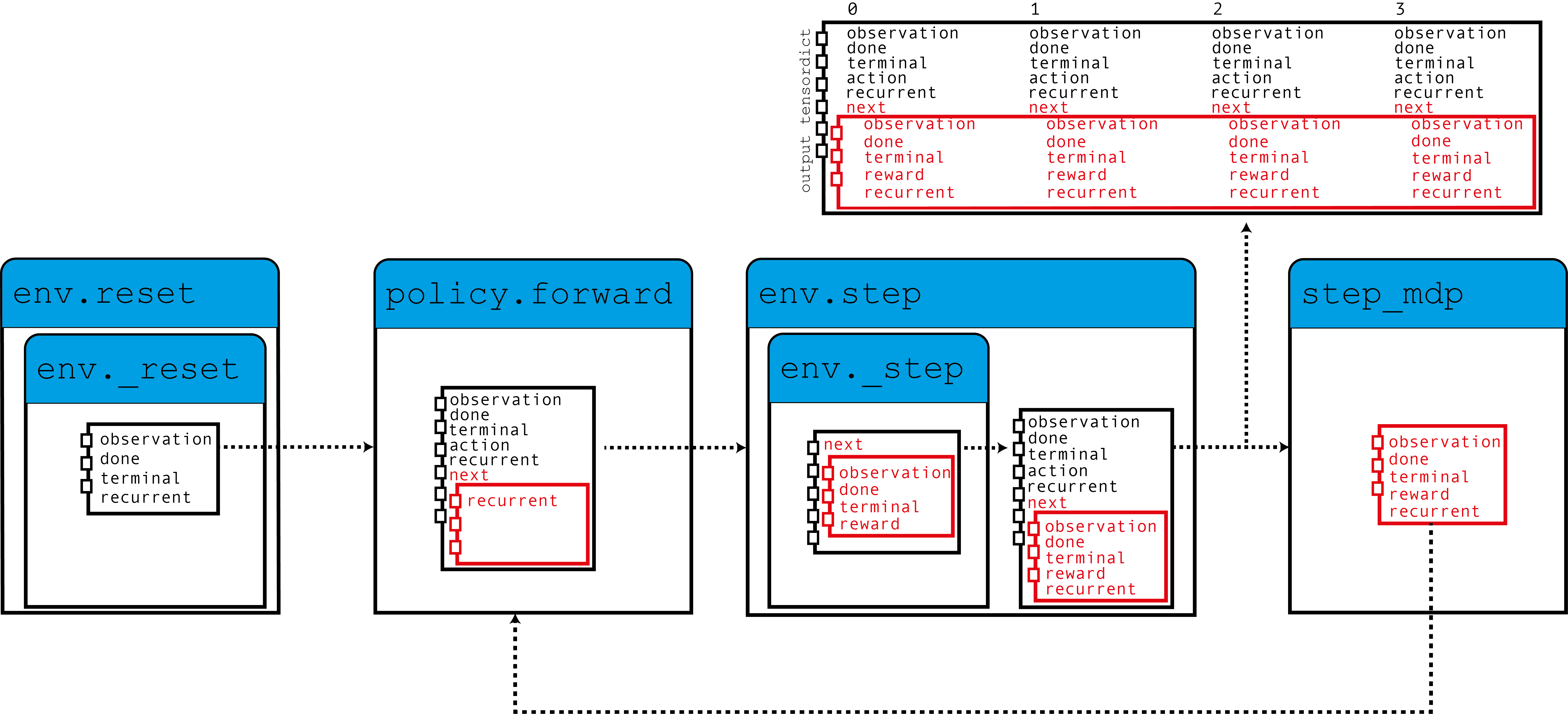
如图所示,我们的环境将零初始化的循环状态填充到TensorDict中,这些循环状态与观察值一起被策略读取以生成动作,并且这些循环状态将在下一步使用。
当调用step_mdp()函数时,来自下一个状态的循环状态被带入当前的TensorDict。让我们看看这在实践中是如何实现的。
如果您在 Google Colab 中运行此代码,请确保安装以下依赖项:
!pip3 install torchrl
!pip3 install gym[mujoco]
!pip3 install tqdm
设置
import torch
import tqdm
from tensordict.nn import (
    TensorDictModule as Mod,
    TensorDictSequential,
    TensorDictSequential as Seq,
)
from torch import nn
from torchrl.collectors import SyncDataCollector
from torchrl.data import LazyMemmapStorage, TensorDictReplayBuffer
from torchrl.envs import (
    Compose,
    ExplorationType,
    GrayScale,
    InitTracker,
    ObservationNorm,
    Resize,
    RewardScaling,
    set_exploration_type,
    StepCounter,
    ToTensorImage,
    TransformedEnv,
)
from torchrl.envs.libs.gym import GymEnv
from torchrl.modules import ConvNet, EGreedyModule, LSTMModule, MLP, QValueModule
from torchrl.objectives import DQNLoss, SoftUpdate

is_fork = multiprocessing.get_start_method() == "fork"
device = (
    torch.device(0)
    if torch.cuda.is_available() and not is_fork
    else torch.device("cpu")
)
环境
和往常一样,第一步是构建我们的环境:这有助于我们定义问题,并据此构建策略网络。在本教程中,我们将运行一个基于像素的单实例 CartPole Gym 环境,并应用一些自定义变换:转为灰度图、调整尺寸至 84×84、缩小奖励值,并对观测值进行归一化处理。
注意
The StepCounter 变换是辅助的。由于CartPole任务的目标是使轨迹尽可能长,计数步骤可以帮助我们跟踪策略的表现。
对于本教程的目的,有两个变换非常重要:
InitTracker将在调用reset()时添加一个"is_init"布尔掩码到 TensorDict 中,以跟踪哪些步骤需要重置 RNN 隐藏状态。The
TensorDictPrimer转换稍微复杂一些。它不是使用RNN策略所必需的。但是,它指示环境(随后是收集器)期望一些额外的键。一旦添加,调用 env.reset() 将使用零张量填充引物中指示的条目。由于策略期望这些张量,收集器将在收集过程中传递它们。最终,我们将把隐藏状态存储在重放缓冲区中,这将帮助我们在损失模块中引导RNN操作的计算(否则将从0开始)。总之:不包括这个转换不会对我们的策略训练产生太大影响,但它会使收集的数据和重放缓冲区中的循环键消失,从而导致稍欠优化的训练。 幸运的是,我们提出的LSTMModule配备了一个辅助方法来构建这样的转换,因此我们可以等到构建它!
env = TransformedEnv(
    GymEnv("CartPole-v1", from_pixels=True, device=device),
    Compose(
        ToTensorImage(),
        GrayScale(),
        Resize(84, 84),
        StepCounter(),
        InitTracker(),
        RewardScaling(loc=0.0, scale=0.1),
        ObservationNorm(standard_normal=True, in_keys=["pixels"]),
    ),
)
一如既往,我们需要手动初始化我们的归一化常数:
env.transform[-1].init_stats(1000, reduce_dim=[0, 1, 2], cat_dim=0, keep_dims=[0])
td = env.reset()
政策
我们的策略将包含3个组件:一个ConvNet主干,一个LSTMModule记忆层和一个浅层的MLP块,该块将LSTM输出映射到动作值。
卷积网络
我们构建了一个带有 torch.nn.AdaptiveAvgPool2d
的卷积网络,它将输出压缩为大小为64的向量。ConvNet
可以帮助我们实现这一点:
feature = Mod(
    ConvNet(
        num_cells=[32, 32, 64],
        squeeze_output=True,
        aggregator_class=nn.AdaptiveAvgPool2d,
        aggregator_kwargs={"output_size": (1, 1)},
        device=device,
    ),
    in_keys=["pixels"],
    out_keys=["embed"],
)
我们对一批数据执行第一个模块,以获取输出向量的尺寸:
n_cells = feature(env.reset())["embed"].shape[-1]
LSTM 模块
TorchRL 提供了一个专门的 LSTMModule 类
来在您的代码库中集成 LSTMs。它是一个 TensorDictModuleBase
子类:因此,它有一组 in_keys 和 out_keys 来指示
在模块执行期间应该读取和写入/更新哪些值。该类附带了这些属性的可自定义预定义值,
以方便其构建。
注意
使用限制: 该类支持几乎所有LSTM功能,例如
dropout 或多层LSTM。
但是,为了遵循TorchRL的约定,此LSTM必须将 batch_first
属性设置为 True,这在PyTorch中不是默认值。但是,
我们的 LSTMModule 改变了这种默认
行为,因此我们可以直接调用。
此外,LSTM 不能将 bidirectional 属性设置为 True,因为这在在线环境中无法使用。在这种情况下,默认值是正确的。
lstm = LSTMModule(
    input_size=n_cells,
    hidden_size=128,
    device=device,
    in_key="embed",
    out_key="embed",
)
让我们来看看 LSTM Module 类,特别是它的 in 和 out_keys:
print("in_keys", lstm.in_keys)
print("out_keys", lstm.out_keys)
in_keys ['embed', 'recurrent_state_h', 'recurrent_state_c', 'is_init']
out_keys ['embed', ('next', 'recurrent_state_h'), ('next', 'recurrent_state_c')]
我们可以看到这些值包含了我们指定为 in_key(和 out_key)的键,以及循环键名。out_keys 以“next”前缀开头,表示它们需要写入“next”TensorDict 中。我们使用这种约定(可以通过传递 in_keys/out_keys 参数来覆盖),以确保调用 step_mdp() 将会将循环状态移动到根 TensorDict 中,使其在下一次调用时可供 RNN 使用(参见介绍中的图示)。
如前所述,我们还有一个可选的转换需要添加到我们的环境中,以确保循环状态被传递到缓冲区。make_tensordict_primer()方法正好做到了这一点:
env.append_transform(lstm.make_tensordict_primer())
TransformedEnv(
    env=GymEnv(env=CartPole-v1, batch_size=torch.Size([]), device=cpu),
    transform=Compose(
            ToTensorImage(keys=['pixels']),
            GrayScale(keys=['pixels']),
            Resize(w=84, h=84, interpolation=InterpolationMode.BILINEAR, keys=['pixels']),
            StepCounter(keys=[]),
            InitTracker(keys=[]),
            RewardScaling(loc=0.0000, scale=0.1000, keys=['reward']),
            ObservationNorm(keys=['pixels']),
            TensorDictPrimer(primers=Composite(
                recurrent_state_h: UnboundedContinuous(
                    shape=torch.Size([1, 128]),
                    space=ContinuousBox(
                        low=Tensor(shape=torch.Size([1, 128]), device=cpu, dtype=torch.float32, contiguous=True),
                        high=Tensor(shape=torch.Size([1, 128]), device=cpu, dtype=torch.float32, contiguous=True)),
                    device=cpu,
                    dtype=torch.float32,
                    domain=continuous),
                recurrent_state_c: UnboundedContinuous(
                    shape=torch.Size([1, 128]),
                    space=ContinuousBox(
                        low=Tensor(shape=torch.Size([1, 128]), device=cpu, dtype=torch.float32, contiguous=True),
                        high=Tensor(shape=torch.Size([1, 128]), device=cpu, dtype=torch.float32, contiguous=True)),
                    device=cpu,
                    dtype=torch.float32,
                    domain=continuous),
                device=cpu,
                shape=torch.Size([])), default_value={'recurrent_state_h': 0.0, 'recurrent_state_c': 0.0}, random=None)))
就这样!我们可以打印环境信息,以确认在添加了入门指南后,一切看起来都正常。
print(env)
TransformedEnv(
    env=GymEnv(env=CartPole-v1, batch_size=torch.Size([]), device=cpu),
    transform=Compose(
            ToTensorImage(keys=['pixels']),
            GrayScale(keys=['pixels']),
            Resize(w=84, h=84, interpolation=InterpolationMode.BILINEAR, keys=['pixels']),
            StepCounter(keys=[]),
            InitTracker(keys=[]),
            RewardScaling(loc=0.0000, scale=0.1000, keys=['reward']),
            ObservationNorm(keys=['pixels']),
            TensorDictPrimer(primers=Composite(
                recurrent_state_h: UnboundedContinuous(
                    shape=torch.Size([1, 128]),
                    space=ContinuousBox(
                        low=Tensor(shape=torch.Size([1, 128]), device=cpu, dtype=torch.float32, contiguous=True),
                        high=Tensor(shape=torch.Size([1, 128]), device=cpu, dtype=torch.float32, contiguous=True)),
                    device=cpu,
                    dtype=torch.float32,
                    domain=continuous),
                recurrent_state_c: UnboundedContinuous(
                    shape=torch.Size([1, 128]),
                    space=ContinuousBox(
                        low=Tensor(shape=torch.Size([1, 128]), device=cpu, dtype=torch.float32, contiguous=True),
                        high=Tensor(shape=torch.Size([1, 128]), device=cpu, dtype=torch.float32, contiguous=True)),
                    device=cpu,
                    dtype=torch.float32,
                    domain=continuous),
                device=cpu,
                shape=torch.Size([])), default_value={'recurrent_state_h': 0.0, 'recurrent_state_c': 0.0}, random=None)))
MLP
我们使用单层多层感知机(MLP)来表示将用于策略的动作值。
并将偏差填充为零:
mlp[-1].bias.data.fill_(0.0)
mlp = Mod(mlp, in_keys=["embed"], out_keys=["action_value"])
使用Q值选择动作
我们策略的最后一部分是Q值模块。
Q值模块 QValueModule
将读取由我们的MLP生成的"action_values"键,并从中收集具有最大值的动作。
我们需要做的唯一一件事是指定动作空间,这可以通过传递字符串或动作规范来完成。这允许我们使用分类(有时称为“稀疏”)编码或其独热版本。
qval = QValueModule(action_space=None, spec=env.action_spec)
注意
TorchRL 还提供了一个包装类 torchrl.modules.QValueActor,该类将一个模块与一个 QValueModule 一起包装在一个 Sequential 中,就像我们在这里显式地做的那样。这样做几乎没有优势,并且过程不够透明,但最终结果将类似于我们在这里所做的。
我们现在可以将这些内容组合在一起了 TensorDictSequential
policy = Seq(feature, lstm, mlp, qval)
DQN作为一种确定性算法,探索是其重要组成部分。
我们将使用一个\(\epsilon\)-贪婪策略,epsilon为0.2,并逐渐衰减至0。
这种衰减是通过调用step()实现的(参见下面的训练循环)。
exploration_module = EGreedyModule(
    annealing_num_steps=1_000_000, spec=env.action_spec, eps_init=0.2
)
stoch_policy = TensorDictSequential(
    policy,
    exploration_module,
)
使用模型进行损失计算
我们构建的模型非常适合在序列环境中使用。
然而,类 torch.nn.LSTM 可以使用 cuDNN 优化的后端
在 GPU 设备上更快地运行 RNN 序列。我们不想错过
这样一个加快训练循环的机会!
默认情况下,torchrl 损失将在执行任何 LSTMModule 或 GRUModule 前向调用时使用此设置。如果您需要手动控制这一点,RNN 模块对上下文管理器/装饰器 set_recurrent_mode 敏感,该装饰器处理底层 RNN 模块的行为。
因为我们仍有几个未初始化的参数,所以在创建优化器等之前,应先对它们进行初始化。
policy(env.reset())
TensorDict(
    fields={
        action: Tensor(shape=torch.Size([2]), device=cpu, dtype=torch.int64, is_shared=False),
        action_value: Tensor(shape=torch.Size([2]), device=cpu, dtype=torch.float32, is_shared=False),
        chosen_action_value: Tensor(shape=torch.Size([1]), device=cpu, dtype=torch.float32, is_shared=False),
        done: Tensor(shape=torch.Size([1]), device=cpu, dtype=torch.bool, is_shared=False),
        embed: Tensor(shape=torch.Size([128]), device=cpu, dtype=torch.float32, is_shared=False),
        is_init: Tensor(shape=torch.Size([1]), device=cpu, dtype=torch.bool, is_shared=False),
        next: TensorDict(
            fields={
                recurrent_state_c: Tensor(shape=torch.Size([1, 128]), device=cpu, dtype=torch.float32, is_shared=False),
                recurrent_state_h: Tensor(shape=torch.Size([1, 128]), device=cpu, dtype=torch.float32, is_shared=False)},
            batch_size=torch.Size([]),
            device=cpu,
            is_shared=False),
        pixels: Tensor(shape=torch.Size([1, 84, 84]), device=cpu, dtype=torch.float32, is_shared=False),
        recurrent_state_c: Tensor(shape=torch.Size([1, 128]), device=cpu, dtype=torch.float32, is_shared=False),
        recurrent_state_h: Tensor(shape=torch.Size([1, 128]), device=cpu, dtype=torch.float32, is_shared=False),
        step_count: Tensor(shape=torch.Size([1]), device=cpu, dtype=torch.int64, is_shared=False),
        terminated: Tensor(shape=torch.Size([1]), device=cpu, dtype=torch.bool, is_shared=False),
        truncated: Tensor(shape=torch.Size([1]), device=cpu, dtype=torch.bool, is_shared=False)},
    batch_size=torch.Size([]),
    device=cpu,
    is_shared=False)
DQN 损失
Out DQN loss 需要我们传递策略和,再次,动作空间。
虽然这可能看起来冗余,但这是很重要的,因为我们希望确保
DQNLoss 和 QValueModule
类是兼容的,但彼此之间没有强依赖关系。
要使用Double-DQN,我们需要一个delay_value参数,该参数将创建网络参数的非可微副本,用于作为目标网络。
loss_fn = DQNLoss(policy, action_space=env.action_spec, delay_value=True)
由于我们使用的是双DQN,我们需要更新目标参数。
我们将使用一个 SoftUpdate 实例来执行这项工作。
updater = SoftUpdate(loss_fn, eps=0.95)

optim = torch.optim.Adam(policy.parameters(), lr=3e-4)
Collector 和重放缓冲区
我们构建了最简单的数据收集器。我们将尝试用一百万帧来训练我们的算法,每次扩展缓冲区50帧。缓冲区将被设计为存储2万个轨迹,每个轨迹包含50个步骤。
在每次优化步骤(每收集一次数据有16个优化步骤)中,我们将从缓冲区中收集4个项目,总共200个转换。
我们将使用一个LazyMemmapStorage 存储来将数据保存在磁盘上。
注意
为提高效率,此处仅运行数千次迭代。 在实际应用中,总帧数应设为 100 万。
collector = SyncDataCollector(env, stoch_policy, frames_per_batch=50, total_frames=200)
rb = TensorDictReplayBuffer(
    storage=LazyMemmapStorage(20_000), batch_size=4, prefetch=10
)
训练循环
为跟踪训练进度,我们将每收集 50 次数据后在环境中运行一次策略,并在训练完成后绘制结果。
utd = 16
pbar = tqdm.tqdm(total=collector.total_frames)
longest = 0

traj_lens = []
for i, data in enumerate(collector):
    if i == 0:
        print(
            "Let us print the first batch of data.\nPay attention to the key names "
            "which will reflect what can be found in this data structure, in particular: "
            "the output of the QValueModule (action_values, action and chosen_action_value),"
            "the 'is_init' key that will tell us if a step is initial or not, and the "
            "recurrent_state keys.\n",
            data,
        )
    pbar.update(data.numel())
    # it is important to pass data that is not flattened
    rb.extend(data.unsqueeze(0).to_tensordict().cpu())
    for _ in range(utd):
        s = rb.sample().to(device, non_blocking=True)
        loss_vals = loss_fn(s)
        loss_vals["loss"].backward()
        optim.step()
        optim.zero_grad()
    longest = max(longest, data["step_count"].max().item())
    pbar.set_description(
        f"steps: {longest}, loss_val: {loss_vals['loss'].item(): 4.4f}, action_spread: {data['action'].sum(0)}"
    )
    exploration_module.step(data.numel())
    updater.step()

    with set_exploration_type(ExplorationType.DETERMINISTIC), torch.no_grad():
        rollout = env.rollout(10000, stoch_policy)
        traj_lens.append(rollout.get(("next", "step_count")).max().item())
  0%|          | 0/200 [00:00<?, ?it/s]Let us print the first batch of data.
Pay attention to the key names which will reflect what can be found in this data structure, in particular: the output of the QValueModule (action_values, action and chosen_action_value),the 'is_init' key that will tell us if a step is initial or not, and the recurrent_state keys.
 TensorDict(
    fields={
        action: Tensor(shape=torch.Size([50, 2]), device=cpu, dtype=torch.int64, is_shared=False),
        action_value: Tensor(shape=torch.Size([50, 2]), device=cpu, dtype=torch.float32, is_shared=False),
        chosen_action_value: Tensor(shape=torch.Size([50, 1]), device=cpu, dtype=torch.float32, is_shared=False),
        collector: TensorDict(
            fields={
                traj_ids: Tensor(shape=torch.Size([50]), device=cpu, dtype=torch.int64, is_shared=False)},
            batch_size=torch.Size([50]),
            device=None,
            is_shared=False),
        done: Tensor(shape=torch.Size([50, 1]), device=cpu, dtype=torch.bool, is_shared=False),
        embed: Tensor(shape=torch.Size([50, 128]), device=cpu, dtype=torch.float32, is_shared=False),
        is_init: Tensor(shape=torch.Size([50, 1]), device=cpu, dtype=torch.bool, is_shared=False),
        next: TensorDict(
            fields={
                done: Tensor(shape=torch.Size([50, 1]), device=cpu, dtype=torch.bool, is_shared=False),
                is_init: Tensor(shape=torch.Size([50, 1]), device=cpu, dtype=torch.bool, is_shared=False),
                pixels: Tensor(shape=torch.Size([50, 1, 84, 84]), device=cpu, dtype=torch.float32, is_shared=False),
                recurrent_state_c: Tensor(shape=torch.Size([50, 1, 128]), device=cpu, dtype=torch.float32, is_shared=False),
                recurrent_state_h: Tensor(shape=torch.Size([50, 1, 128]), device=cpu, dtype=torch.float32, is_shared=False),
                reward: Tensor(shape=torch.Size([50, 1]), device=cpu, dtype=torch.float32, is_shared=False),
                step_count: Tensor(shape=torch.Size([50, 1]), device=cpu, dtype=torch.int64, is_shared=False),
                terminated: Tensor(shape=torch.Size([50, 1]), device=cpu, dtype=torch.bool, is_shared=False),
                truncated: Tensor(shape=torch.Size([50, 1]), device=cpu, dtype=torch.bool, is_shared=False)},
            batch_size=torch.Size([50]),
            device=None,
            is_shared=False),
        pixels: Tensor(shape=torch.Size([50, 1, 84, 84]), device=cpu, dtype=torch.float32, is_shared=False),
        recurrent_state_c: Tensor(shape=torch.Size([50, 1, 128]), device=cpu, dtype=torch.float32, is_shared=False),
        recurrent_state_h: Tensor(shape=torch.Size([50, 1, 128]), device=cpu, dtype=torch.float32, is_shared=False),
        step_count: Tensor(shape=torch.Size([50, 1]), device=cpu, dtype=torch.int64, is_shared=False),
        terminated: Tensor(shape=torch.Size([50, 1]), device=cpu, dtype=torch.bool, is_shared=False),
        truncated: Tensor(shape=torch.Size([50, 1]), device=cpu, dtype=torch.bool, is_shared=False)},
    batch_size=torch.Size([50]),
    device=None,
    is_shared=False)

 25%|██▌       | 50/200 [00:00<00:01, 137.46it/s]
 25%|██▌       | 50/200 [00:15<00:01, 137.46it/s]
steps: 9, loss_val:  0.0006, action_spread: tensor([46,  4]):  25%|██▌       | 50/200 [00:34<00:01, 137.46it/s]
steps: 9, loss_val:  0.0006, action_spread: tensor([46,  4]):  50%|█████     | 100/200 [00:34<00:40,  2.45it/s]
steps: 12, loss_val:  0.0005, action_spread: tensor([44,  6]):  50%|█████     | 100/200 [01:08<00:40,  2.45it/s]
steps: 12, loss_val:  0.0005, action_spread: tensor([44,  6]):  75%|███████▌  | 150/200 [01:09<00:26,  1.86it/s]
steps: 20, loss_val:  0.0003, action_spread: tensor([13, 37]):  75%|███████▌  | 150/200 [01:42<00:26,  1.86it/s]
steps: 20, loss_val:  0.0003, action_spread: tensor([13, 37]): 100%|██████████| 200/200 [01:43<00:00,  1.68it/s]
steps: 20, loss_val:  0.0005, action_spread: tensor([43,  7]): 100%|██████████| 200/200 [02:16<00:00,  1.68it/s]
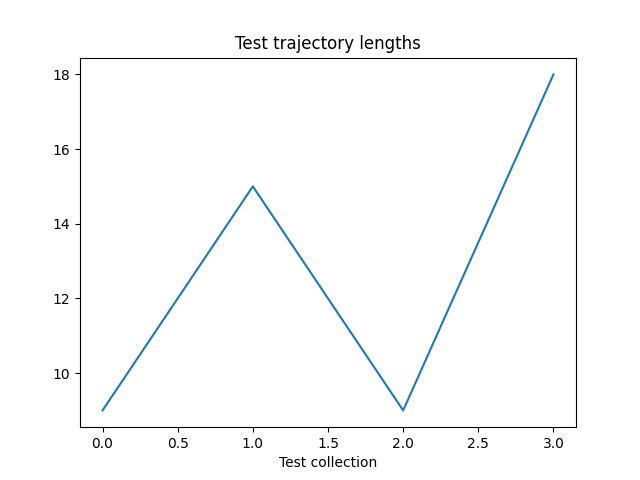
让我们绘制我们的结果:
if traj_lens:
    from matplotlib import pyplot as plt

    plt.plot(traj_lens)
    plt.xlabel("Test collection")
    plt.title("Test trajectory lengths")
结论
我们已经了解了如何在 TorchRL 的策略中整合 RNN。 你现在应该能够:
创建一个充当
TensorDictModule的LSTM模块向LSTM模块指示需要重置通过一个
InitTracker转换将此模块集成到策略中和损失模块中
确保采集器知晓循环状态条目, 以便它们能与其余数据一同存储在回放缓冲区中
进一步阅读
TorchRL 文档可在此处找到 此处。
脚本总运行时间: (3 分钟 18.312 秒)
估计内存使用量: 2191 MB