注意
点击 这里 下载完整示例代码
使用 Tacotron2 进行文本转语音
概述
本教程展示了如何使用 torchaudio 中预训练的 Tacotron2 构建文本转语音流程。
文本转语音流程如下:
文本预处理
首先,输入文本被编码为符号列表。在本教程中,我们将使用英文字符和音素作为符号。
频谱图生成
从编码文本生成频谱图。我们使用
Tacotron2模型来完成此操作。时域转换
最后一步是将频谱图转换为波形。从频谱图生成语音的过程也称为声码器(Vocoder)。在本教程中,使用了三种不同的声码器:
WaveRNN、GriffinLim以及 Nvidia 的 WaveGlow。
下图展示了整个流程。
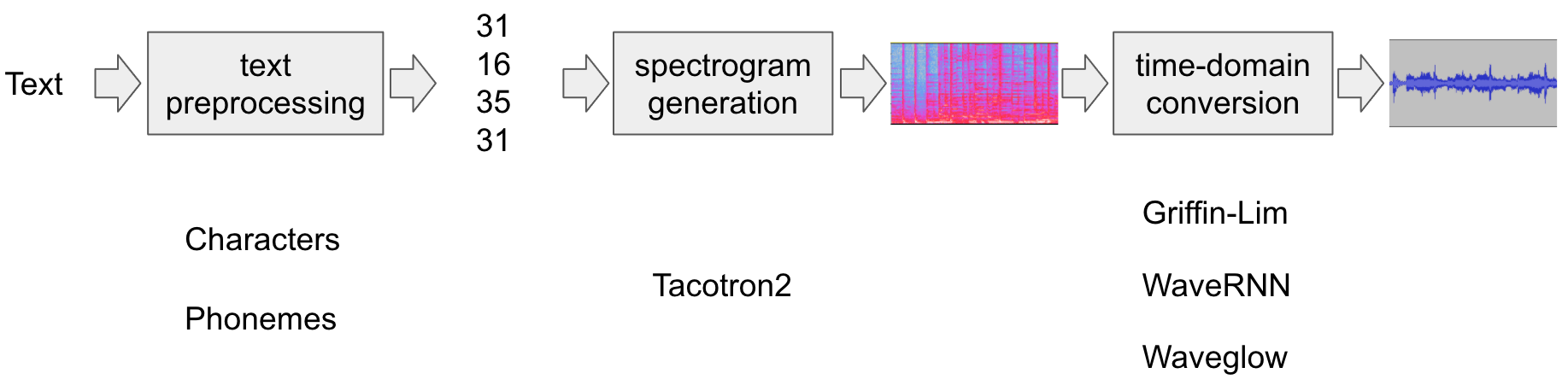
所有相关组件都打包在 torchaudio.pipelines.Tacotron2TTSBundle 中,
但本教程也将涵盖其背后的处理过程。
准备
首先,我们安装必要的依赖项。除了
torchaudio,还需要 DeepPhonemizer 来执行基于音素的编码。
%%bash
pip3 install deep_phonemizer
import torch
import torchaudio

torch.random.manual_seed(0)
device = "cuda" if torch.cuda.is_available() else "cpu"

print(torch.__version__)
print(torchaudio.__version__)
print(device)
2.3.0
2.3.0
cuda
import IPython
import matplotlib.pyplot as plt
文本处理
基于字符的编码
在本节中,我们将介绍基于字符的编码是如何工作的。
由于预训练的 Tacotron2 模型需要特定的符号表,相同的功能在 torchaudio 中也可用。不过,我们将首先手动实现编码以帮助理解。
首先,我们定义符号集
'_-!\'(),.:;? abcdefghijklmnopqrstuvwxyz'。然后,我们将输入文本的每个字符映射到表中对应符号的索引。不在表中的符号将被忽略。
[19, 16, 23, 23, 26, 11, 34, 26, 29, 23, 15, 2, 11, 31, 16, 35, 31, 11, 31, 26, 11, 30, 27, 16, 16, 14, 19, 2]
如上所述,符号表和索引必须与预训练的 Tacotron2 模型所期望的一致。torchaudio 提供了与预训练模型相同的转换。您可以按以下方式实例化并使用此类转换。
tensor([[19, 16, 23, 23, 26, 11, 34, 26, 29, 23, 15,  2, 11, 31, 16, 35, 31, 11,
         31, 26, 11, 30, 27, 16, 16, 14, 19,  2]])
tensor([28], dtype=torch.int32)
注意:我们手动编码的输出与 torchaudio text_processor 输出相匹配(意味着我们正确地重新实现了库内部的操作)。它接受文本或文本列表作为输入。
当提供文本列表时,返回的 lengths 变量
表示输出批次中每个处理后的令牌的有效长度。
中间表示可按以下方式获取:
['h', 'e', 'l', 'l', 'o', ' ', 'w', 'o', 'r', 'l', 'd', '!', ' ', 't', 'e', 'x', 't', ' ', 't', 'o', ' ', 's', 'p', 'e', 'e', 'c', 'h', '!']
基于音素的编码
基于音素的编码与基于字符的编码类似,但它使用基于音素的符号表和一个 G2P(字形到音素)模型。
G2P 模型的细节超出了本教程的范围,我们只需查看转换后的结果即可。
与基于字符的编码情况类似,编码过程应与预训练的 Tacotron2 模型所训练的内容相匹配。
torchaudio 提供了一个用于创建该过程的接口。
以下代码说明了如何创建和使用该流程。在后台,使用 DeepPhonemizer 包创建一个 G2P 模型,并获取 DeepPhonemizer 的作者发布的预训练权重。
  0%|          | 0.00/63.6M [00:00<?, ?B/s]
  0%|          | 128k/63.6M [00:00<01:32, 722kB/s]
  1%|          | 384k/63.6M [00:00<00:57, 1.15MB/s]
  2%|1         | 1.25M/63.6M [00:00<00:22, 2.93MB/s]
  7%|7         | 4.75M/63.6M [00:00<00:05, 10.9MB/s]
 12%|#2        | 7.75M/63.6M [00:00<00:03, 14.7MB/s]
 21%|##        | 13.2M/63.6M [00:00<00:02, 23.5MB/s]
 26%|##6       | 16.6M/63.6M [00:01<00:02, 24.2MB/s]
 34%|###4      | 21.8M/63.6M [00:01<00:01, 31.4MB/s]
 39%|###9      | 25.1M/63.6M [00:01<00:01, 30.4MB/s]
 45%|####4     | 28.4M/63.6M [00:01<00:01, 28.6MB/s]
 50%|####9     | 31.8M/63.6M [00:01<00:01, 30.2MB/s]
 58%|#####7    | 36.6M/63.6M [00:01<00:00, 33.6MB/s]
 63%|######3   | 40.1M/63.6M [00:01<00:00, 33.5MB/s]
 68%|######8   | 43.5M/63.6M [00:01<00:00, 31.3MB/s]
 76%|#######5  | 48.2M/63.6M [00:02<00:00, 34.3MB/s]
 82%|########1 | 52.0M/63.6M [00:02<00:00, 32.4MB/s]
 87%|########6 | 55.2M/63.6M [00:02<00:00, 32.2MB/s]
 94%|#########4| 60.1M/63.6M [00:02<00:00, 35.4MB/s]
100%|##########| 63.6M/63.6M [00:02<00:00, 26.7MB/s]
/pytorch/audio/ci_env/lib/python3.10/site-packages/torch/nn/modules/transformer.py:306: UserWarning: enable_nested_tensor is True, but self.use_nested_tensor is False because encoder_layer.self_attn.batch_first was not True(use batch_first for better inference performance)
  warnings.warn(f"enable_nested_tensor is True, but self.use_nested_tensor is False because {why_not_sparsity_fast_path}")
tensor([[54, 20, 65, 69, 11, 92, 44, 65, 38,  2, 11, 81, 40, 64, 79, 81, 11, 81,
         20, 11, 79, 77, 59, 37,  2]])
tensor([25], dtype=torch.int32)
请注意,编码后的值与基于字符的编码示例不同。
中间表示形式如下所示。
['HH', 'AH', 'L', 'OW', ' ', 'W', 'ER', 'L', 'D', '!', ' ', 'T', 'EH', 'K', 'S', 'T', ' ', 'T', 'AH', ' ', 'S', 'P', 'IY', 'CH', '!']
频谱图生成
Tacotron2 是我们用来从编码文本生成频谱图的模型。有关该模型的详细信息,请参阅 论文。
使用预训练权重实例化 Tacotron2 模型非常简单,但请注意,输入到 Tacotron2 模型的数据需要经过匹配文本处理器的处理。
torchaudio.pipelines.Tacotron2TTSBundle 将匹配的模型和处理器捆绑在一起,以便轻松创建流水线。
有关可用的捆绑包及其用法,请参阅
Tacotron2TTSBundle。
bundle = torchaudio.pipelines.TACOTRON2_WAVERNN_PHONE_LJSPEECH
processor = bundle.get_text_processor()
tacotron2 = bundle.get_tacotron2().to(device)

text = "Hello world! Text to speech!"

with torch.inference_mode():
    processed, lengths = processor(text)
    processed = processed.to(device)
    lengths = lengths.to(device)
    spec, _, _ = tacotron2.infer(processed, lengths)


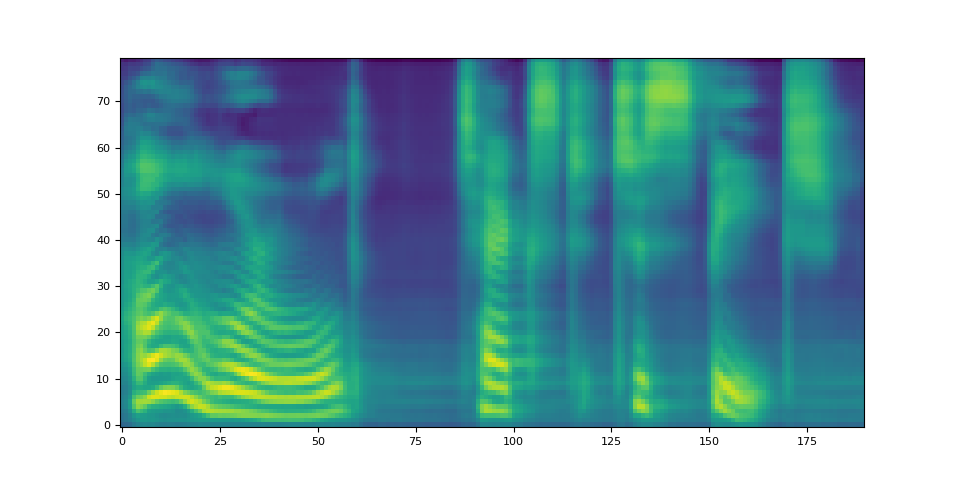
_ = plt.imshow(spec[0].cpu().detach(), origin="lower", aspect="auto")
/pytorch/audio/ci_env/lib/python3.10/site-packages/torch/nn/modules/transformer.py:306: UserWarning: enable_nested_tensor is True, but self.use_nested_tensor is False because encoder_layer.self_attn.batch_first was not True(use batch_first for better inference performance)
  warnings.warn(f"enable_nested_tensor is True, but self.use_nested_tensor is False because {why_not_sparsity_fast_path}")
Downloading: "https://download.pytorch.org/torchaudio/models/tacotron2_english_phonemes_1500_epochs_wavernn_ljspeech.pth" to /root/.cache/torch/hub/checkpoints/tacotron2_english_phonemes_1500_epochs_wavernn_ljspeech.pth

  0%|          | 0.00/107M [00:00<?, ?B/s]
 12%|#2        | 13.4M/107M [00:00<00:00, 140MB/s]
 25%|##4       | 26.8M/107M [00:00<00:01, 57.4MB/s]
 32%|###2      | 34.6M/107M [00:00<00:01, 60.0MB/s]
 45%|####4     | 48.0M/107M [00:00<00:00, 65.2MB/s]
 60%|#####9    | 64.0M/107M [00:00<00:00, 71.0MB/s]
 74%|#######4  | 80.0M/107M [00:01<00:00, 75.0MB/s]
 89%|########9 | 95.8M/107M [00:01<00:00, 86.4MB/s]
 97%|#########7| 105M/107M [00:01<00:00, 66.7MB/s]
100%|##########| 107M/107M [00:01<00:00, 67.7MB/s]
请注意 Tacotron2.infer 方法执行多项式采样,
因此,生成频谱的过程会引入随机性。
def plot():
    fig, ax = plt.subplots(3, 1)
    for i in range(3):
        with torch.inference_mode():
            spec, spec_lengths, _ = tacotron2.infer(processed, lengths)
        print(spec[0].shape)
        ax[i].imshow(spec[0].cpu().detach(), origin="lower", aspect="auto")


plot()
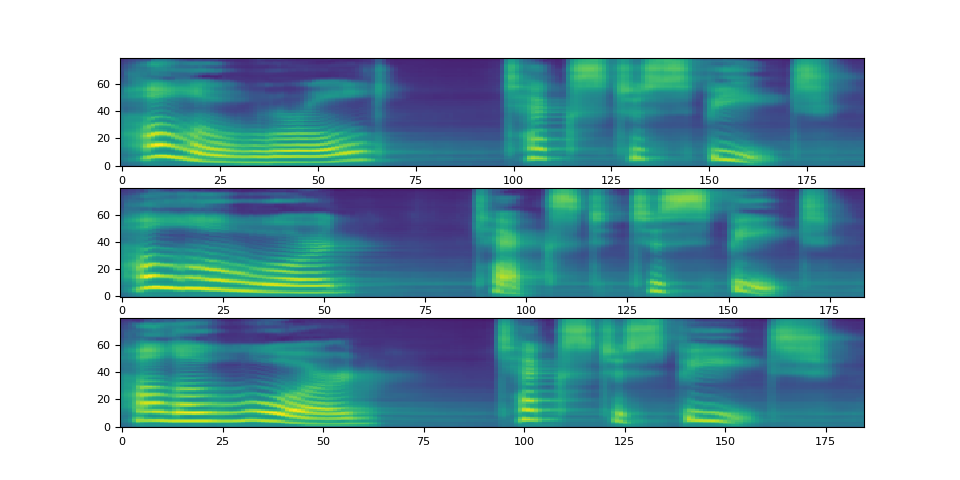
torch.Size([80, 190])
torch.Size([80, 184])
torch.Size([80, 185])
波形生成
生成频谱图后,最后一步是使用声码器从频谱图中恢复波形。
torchaudio 提供基于 GriffinLim 和
WaveRNN 的声码器。
WaveRNN 声码器
承接上一节,我们可以从同一个捆绑包中实例化匹配的 WaveRNN 模型。
bundle = torchaudio.pipelines.TACOTRON2_WAVERNN_PHONE_LJSPEECH

processor = bundle.get_text_processor()
tacotron2 = bundle.get_tacotron2().to(device)
vocoder = bundle.get_vocoder().to(device)

text = "Hello world! Text to speech!"

with torch.inference_mode():
    processed, lengths = processor(text)
    processed = processed.to(device)
    lengths = lengths.to(device)
    spec, spec_lengths, _ = tacotron2.infer(processed, lengths)
    waveforms, lengths = vocoder(spec, spec_lengths)
/pytorch/audio/ci_env/lib/python3.10/site-packages/torch/nn/modules/transformer.py:306: UserWarning: enable_nested_tensor is True, but self.use_nested_tensor is False because encoder_layer.self_attn.batch_first was not True(use batch_first for better inference performance)
  warnings.warn(f"enable_nested_tensor is True, but self.use_nested_tensor is False because {why_not_sparsity_fast_path}")
Downloading: "https://download.pytorch.org/torchaudio/models/wavernn_10k_epochs_8bits_ljspeech.pth" to /root/.cache/torch/hub/checkpoints/wavernn_10k_epochs_8bits_ljspeech.pth

  0%|          | 0.00/16.7M [00:00<?, ?B/s]
 89%|########9 | 14.9M/16.7M [00:00<00:00, 52.6MB/s]
100%|##########| 16.7M/16.7M [00:00<00:00, 45.5MB/s]
def plot(waveforms, spec, sample_rate):
    waveforms = waveforms.cpu().detach()

    fig, [ax1, ax2] = plt.subplots(2, 1)
    ax1.plot(waveforms[0])
    ax1.set_xlim(0, waveforms.size(-1))
    ax1.grid(True)
    ax2.imshow(spec[0].cpu().detach(), origin="lower", aspect="auto")
    return IPython.display.Audio(waveforms[0:1], rate=sample_rate)


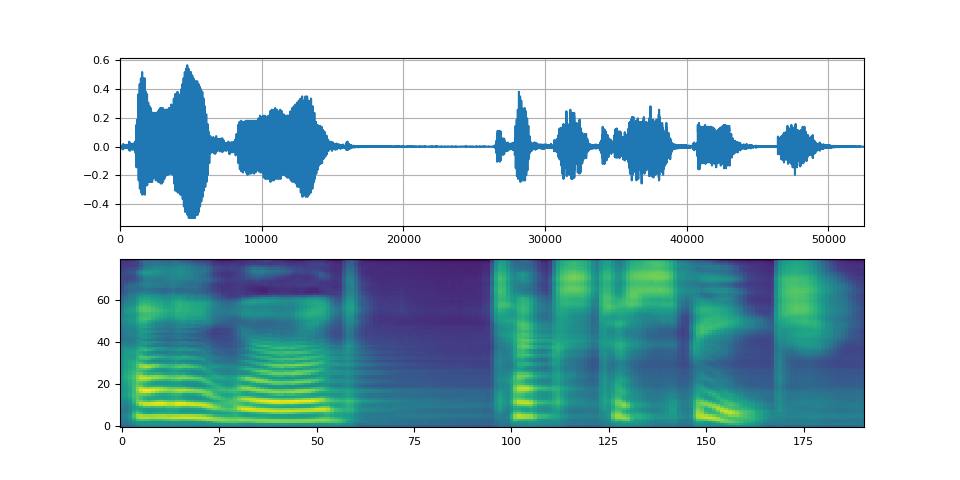
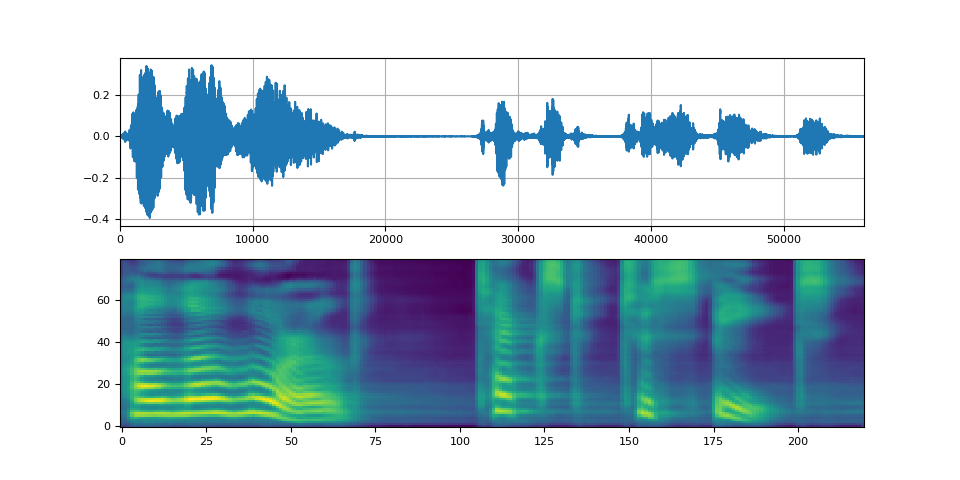
plot(waveforms, spec, vocoder.sample_rate)
Griffin-Lim 声码器
使用 Griffin-Lim 声码器与 WaveRNN 相同。您可以实例化
声码器对象,使用
get_vocoder()
方法并传入频谱图。
bundle = torchaudio.pipelines.TACOTRON2_GRIFFINLIM_PHONE_LJSPEECH

processor = bundle.get_text_processor()
tacotron2 = bundle.get_tacotron2().to(device)
vocoder = bundle.get_vocoder().to(device)

with torch.inference_mode():
    processed, lengths = processor(text)
    processed = processed.to(device)
    lengths = lengths.to(device)
    spec, spec_lengths, _ = tacotron2.infer(processed, lengths)
waveforms, lengths = vocoder(spec, spec_lengths)
/pytorch/audio/ci_env/lib/python3.10/site-packages/torch/nn/modules/transformer.py:306: UserWarning: enable_nested_tensor is True, but self.use_nested_tensor is False because encoder_layer.self_attn.batch_first was not True(use batch_first for better inference performance)
  warnings.warn(f"enable_nested_tensor is True, but self.use_nested_tensor is False because {why_not_sparsity_fast_path}")
Downloading: "https://download.pytorch.org/torchaudio/models/tacotron2_english_phonemes_1500_epochs_ljspeech.pth" to /root/.cache/torch/hub/checkpoints/tacotron2_english_phonemes_1500_epochs_ljspeech.pth

  0%|          | 0.00/107M [00:00<?, ?B/s]
  0%|          | 256k/107M [00:00<00:42, 2.62MB/s]
 15%|#4        | 16.0M/107M [00:00<00:01, 77.4MB/s]
 25%|##5       | 27.0M/107M [00:00<00:00, 92.4MB/s]
 33%|###3      | 35.6M/107M [00:00<00:00, 81.2MB/s]
 44%|####3     | 46.9M/107M [00:00<00:00, 69.1MB/s]
 50%|#####     | 53.8M/107M [00:01<00:01, 44.2MB/s]
 60%|#####9    | 64.0M/107M [00:01<00:00, 46.8MB/s]
 74%|#######4  | 79.6M/107M [00:01<00:00, 67.8MB/s]
 82%|########1 | 88.1M/107M [00:01<00:00, 64.3MB/s]
 89%|########9 | 96.0M/107M [00:01<00:00, 66.0MB/s]
 99%|#########9| 107M/107M [00:01<00:00, 56.8MB/s]
100%|##########| 107M/107M [00:01<00:00, 60.6MB/s]
Waveglow 声码器
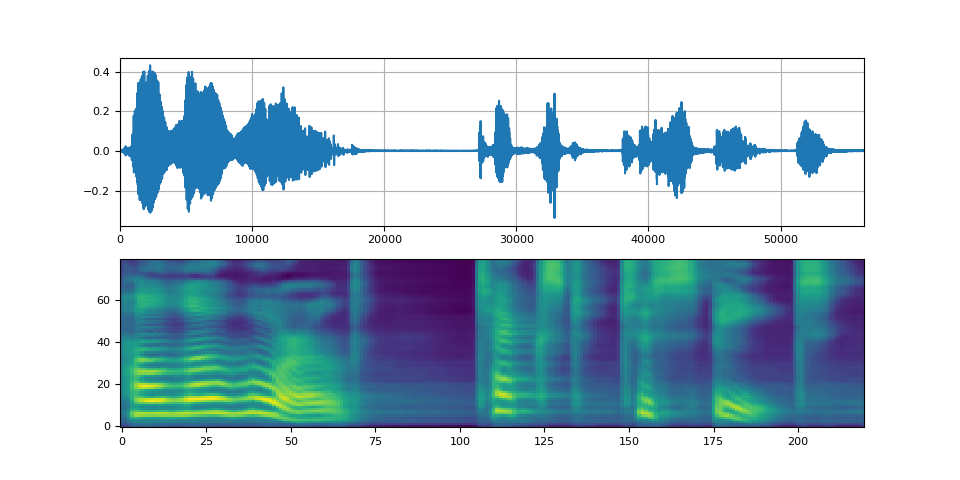
Waveglow 是由 Nvidia 发布的声码器。预训练权重已发布在 Torch Hub 上。可以使用 torch.hub 模块实例化该模型。
# Workaround to load model mapped on GPU
# https://stackoverflow.com/a/61840832
waveglow = torch.hub.load(
    "NVIDIA/DeepLearningExamples:torchhub",
    "nvidia_waveglow",
    model_math="fp32",
    pretrained=False,
)
checkpoint = torch.hub.load_state_dict_from_url(
    "https://api.ngc.nvidia.com/v2/models/nvidia/waveglowpyt_fp32/versions/1/files/nvidia_waveglowpyt_fp32_20190306.pth",  # noqa: E501
    progress=False,
    map_location=device,
)
state_dict = {key.replace("module.", ""): value for key, value in checkpoint["state_dict"].items()}

waveglow.load_state_dict(state_dict)
waveglow = waveglow.remove_weightnorm(waveglow)
waveglow = waveglow.to(device)
waveglow.eval()

with torch.no_grad():
    waveforms = waveglow.infer(spec)
/pytorch/audio/ci_env/lib/python3.10/site-packages/torch/hub.py:293: UserWarning: You are about to download and run code from an untrusted repository. In a future release, this won't be allowed. To add the repository to your trusted list, change the command to {calling_fn}(..., trust_repo=False) and a command prompt will appear asking for an explicit confirmation of trust, or load(..., trust_repo=True), which will assume that the prompt is to be answered with 'yes'. You can also use load(..., trust_repo='check') which will only prompt for confirmation if the repo is not already trusted. This will eventually be the default behaviour
  warnings.warn(
Downloading: "https://github.com/NVIDIA/DeepLearningExamples/zipball/torchhub" to /root/.cache/torch/hub/torchhub.zip
/root/.cache/torch/hub/NVIDIA_DeepLearningExamples_torchhub/PyTorch/Classification/ConvNets/image_classification/models/common.py:13: UserWarning: pytorch_quantization module not found, quantization will not be available
  warnings.warn(
/root/.cache/torch/hub/NVIDIA_DeepLearningExamples_torchhub/PyTorch/Classification/ConvNets/image_classification/models/efficientnet.py:17: UserWarning: pytorch_quantization module not found, quantization will not be available
  warnings.warn(
/pytorch/audio/ci_env/lib/python3.10/site-packages/torch/nn/utils/weight_norm.py:28: UserWarning: torch.nn.utils.weight_norm is deprecated in favor of torch.nn.utils.parametrizations.weight_norm.
  warnings.warn("torch.nn.utils.weight_norm is deprecated in favor of torch.nn.utils.parametrizations.weight_norm.")
Downloading: "https://api.ngc.nvidia.com/v2/models/nvidia/waveglowpyt_fp32/versions/1/files/nvidia_waveglowpyt_fp32_20190306.pth" to /root/.cache/torch/hub/checkpoints/nvidia_waveglowpyt_fp32_20190306.pth
脚本的总运行时间: ( 1 分钟 44.859 秒)